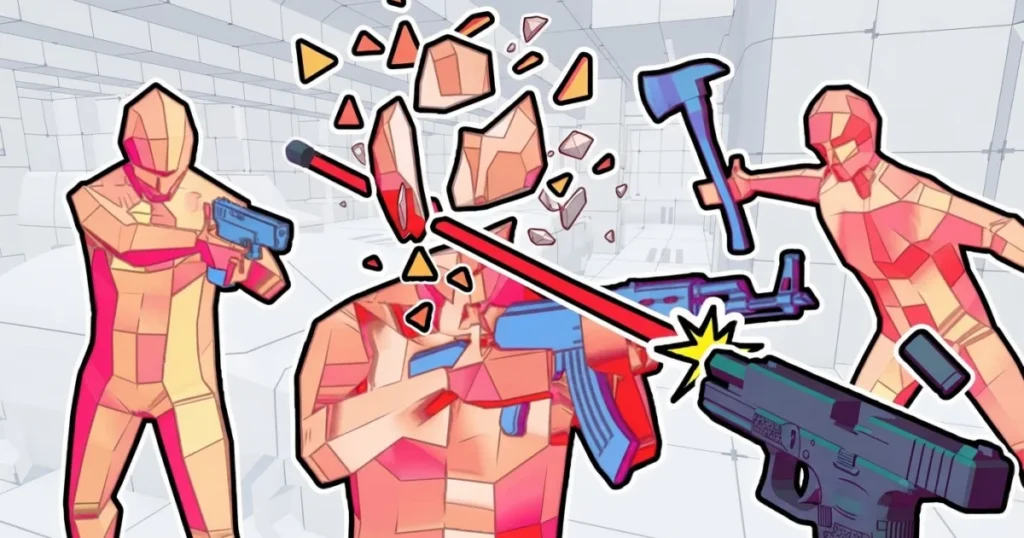










Time Shooter 2 puts you in a first-person shooter where time freezes unless you move. Every step, turn, or shot you make pushes the clock forward, while standing still slows the world to a near halt. Enemies fire bullets that crawl through the air when you stop, giving you time to plan your next dodge or attack. One hit ends your run, so every decision counts.
The game runs in your browser on Arcazi.com using HTML5 and WebGL, with no download or install required. Levels throw waves of armed enemies at you in tight rooms, and you clear each stage by eliminating every threat without taking damage. Weapons scatter across the floor, enemies drop their guns when you disarm them, and environmental objects like gas cylinders explode on impact.
Released in January 2022 by gamesgames, Time Shooter 2 has been updated through September 2026 to refine controls and add new enemy formations. Players on Reddit’s r/WebGames have compared its mechanics to other time-manipulation shooters, noting the game’s focus on tactical positioning over reflexes.
Table of Contents+
What Is Time Shooter 2?
Time Shooter 2 is a single-player FPS where the passage of time depends entirely on your movement. Stand still and bullets hang in the air, enemies freeze mid-stride, and you get a moment to scan the room. Move your mouse to look around, tap a key to sidestep, and the world resumes at full speed. This mechanic turns every firefight into a puzzle where you plot each step before committing.
The game strips out health bars, armor, and regeneration. One bullet kills you, one bullet kills an enemy. Levels start simple with a few scattered opponents, then escalate to rooms packed with gunmen who fire the moment they spot you. You survive by reading bullet trajectories, stealing weapons from enemies, and using throwable objects to clear groups without exposing yourself.
Each stage is a single enclosed arena. You spawn with no weapon, forcing you to grab the nearest gun or disarm an enemy before they shoot. Completing a level unlocks the next, and the difficulty curve ramps up as enemy counts increase and room layouts grow more complex. There is no save system between levels, so a single mistake sends you back to the start of the current stage.
How to Play Time Shooter 2?
Time Shooter 2 works on desktop browsers and mobile devices, with control schemes tailored to each platform. Desktop players use keyboard and mouse for precise aiming and movement, while mobile players rely on touch controls and a virtual joystick. Both versions support the same core mechanics, but the input methods change how you approach combat.
The game runs smoothly in Chrome, Edge, and Firefox without plugins. Load times are short, and the framerate stays consistent even when multiple enemies fill the screen. Mobile performance depends on your device, but most modern phones handle the game without stuttering.
Desktop Keyboard and Mouse Controls
Mouse movement controls your view and aim. Drag the cursor to look around the room, line up shots, and track enemy positions. Left-click fires your equipped weapon, whether it’s a pistol, rifle, or shotgun. Right-click throws your current weapon at an enemy, which can disarm them or knock them down if it connects.
WASD keys handle movement. W moves forward, S moves backward, A strafes left, and D strafes right. You can combine keys to move diagonally, which helps when dodging bullets that approach from multiple angles. Arrow keys also work for movement if you prefer that layout, giving you flexibility in how you position your hands.
Picking up weapons happens automatically when you walk over them. Dropped guns glow slightly to make them easier to spot in cluttered rooms. You can only carry one weapon at a time, so switching means dropping your current gun and grabbing a new one. Throwing your weapon leaves you unarmed until you find another, so plan your tosses carefully.
Mobile Touch and Joystick Navigation
Mobile controls use a virtual joystick on the left side of the screen for movement. Drag your thumb in any direction to walk, and the game translates that input into WASD-style movement. The joystick is responsive, but it takes a few rounds to get used to the dead zone and sensitivity.
Tap the right side of the screen to fire your weapon. Swipe on the right side to aim and look around. The game supports multi-touch, so you can move and aim simultaneously without lifting your fingers. Throwing weapons on mobile requires a dedicated button that appears near your weapon icon, usually in the bottom-right corner.
Touch controls work best on tablets or larger phones where your thumbs have room to move without blocking the screen. Smaller devices can feel cramped during intense firefights, but the time-slowdown mechanic gives you breathing room to reposition your fingers between actions.
Weapons and Interactive Environmental Objects
Weapons in Time Shooter 2 fall into three categories: pistols, rifles, and shotguns. Pistols fire single shots with moderate damage and accuracy. Rifles shoot faster and hold more ammo, making them ideal for clearing multiple enemies in quick succession. Shotguns spread pellets in a cone, which can hit several targets at once if they’re grouped together.
Every weapon has limited ammo. The counter appears near your crosshair, and when it hits zero, the gun becomes useless. You can still throw an empty weapon to disarm an enemy, but it won’t fire anymore. Ammo does not carry over between weapons, so switching guns resets your ammo count to whatever that new weapon holds.
Gas cylinders and explosive barrels sit in most levels, marked by red coloring or warning labels. Shoot one and it detonates, sending a shockwave that kills any enemy within a few meters. Throwable objects like boxes, chairs, and loose debris can also knock down enemies if you hit them directly. These environmental tools let you clear rooms without wasting bullets or exposing yourself to return fire.
Disarming Enemies and Stealing Weapons
Enemies always spawn with weapons in hand. Walk up to an armed opponent and throw your weapon at them with right-click (or the throw button on mobile), and the impact can knock the gun out of their grip. The enemy stumbles, their weapon drops to the floor, and you can pick it up before they recover.
Disarming works best when you approach from the side or behind, where enemies can’t immediately return fire. Frontal disarms are risky because the enemy might shoot before your thrown weapon connects. Time your throw during the moment they’re reloading or turning to face another direction.
Stolen weapons often have more ammo than the guns you find lying around, making disarms a key tactic in later levels where ammo is scarce. You can chain disarms by throwing your weapon at one enemy, grabbing their gun, then immediately throwing that at the next target. This keeps you armed and mobile without stopping to search for pickups.
Utilizing Gas Cylinders and Throwable Items
Gas cylinders explode when shot or struck by a thrown object. Position yourself so enemies stand near a cylinder, then shoot it from a safe distance. The explosion radius is generous, often taking out two or three enemies at once. This saves ammo and reduces the number of active threats you need to dodge.
Throwable items like crates and furniture deal impact damage when they hit an enemy. A direct hit to the head or torso usually kills instantly, while a glancing blow staggers them. Thrown objects travel in an arc, so aim slightly above your target if they’re far away. The time-slowdown mechanic lets you adjust your aim mid-throw by moving your mouse or swiping your screen.
Combining explosives with throwables creates chain reactions. Toss a box at a gas cylinder to trigger the explosion without firing a shot, keeping your position hidden from enemies on the other side of the room. This tactic is especially useful in levels with multiple cylinders clustered together, where one explosion can set off a chain that clears half the stage.
Level Progression and Enemy Behaviors
Time Shooter 2 contains dozens of levels, each one a self-contained arena with a set number of enemies. Early stages place three or four gunmen in open rooms with plenty of cover. Later levels cram ten or more enemies into tight corridors, forcing you to manage multiple lines of fire at once. The game does not display a level counter during play, but community discussions suggest the campaign includes at least 65 stages.
Enemy AI follows simple but effective patterns. Opponents spot you the moment you enter their line of sight, then raise their weapon and fire. They do not take cover, flank, or retreat. Instead, they stand in place and shoot until you eliminate them or move out of view. This predictability lets you bait enemies into wasting shots, then close the distance while they reload.
Levels unlock sequentially. Completing one stage opens the next, and there is no way to skip ahead or replay earlier levels from the main menu. If you fail a level, you restart from the beginning of that stage with no penalty beyond lost time. The game does not track deaths or offer scoring, so your only goal is to reach the end of the campaign.
Understanding the One Hit Elimination System
One bullet kills you, no exceptions. There are no health pickups, shields, or second chances. The moment a projectile touches your character model, the screen fades and you restart the level. This rule applies to every weapon type, from pistols to shotguns, and to environmental hazards like explosions.
Enemies follow the same rule. One shot drops any opponent, regardless of where you hit them. Headshots and body shots deal identical damage, so aim for center mass to maximize your chances of connecting. This symmetry keeps combat fast and fair, rewarding positioning and timing over raw firepower.
The one-hit system makes every movement deliberate. You cannot afford to rush into a room and trade shots with enemies. Instead, you peek around corners, identify threats, and eliminate them one by one before they can return fire. Standing still to observe bullet trajectories becomes a survival tool, not a luxury.
Navigating Crowded Rooms and Enemy Formations
Crowded rooms place enemies in overlapping fields of fire, where moving to dodge one bullet exposes you to another. The solution is to thin the crowd before entering the danger zone. Shoot enemies through doorways, use explosives to clear clusters, or throw objects to create openings.
Enemy formations often include a mix of close-range and long-range threats. Shotgun-wielding enemies stand near doorways, while rifle users hang back in corners. Prioritize the closest threats first, since they have less distance to cover if you need to retreat. Long-range enemies give you more time to dodge their shots, so deal with them after clearing the immediate area.
Some levels feature enemies on elevated platforms or behind low walls. These positions give them cover while leaving you exposed. Counter this by using throwable objects to knock them off balance, or by flanking around the side to attack from an unexpected angle. The time-slowdown mechanic lets you study the room layout before committing to a path.
Advanced Tactical Strategies for Flawless Runs
Flawless runs require eliminating every enemy in a level without taking a single hit. This demands precise movement, efficient weapon use, and constant awareness of bullet trajectories. Advanced players focus on micro-movements to dodge shots, use enemies as shields, and chain kills to maintain momentum.
The key to consistent success is treating each level as a puzzle with multiple solutions. Experiment with different entry points, weapon choices, and kill orders until you find a route that minimizes risk. Once you identify a safe path, repeat it until the execution becomes automatic.
Mastering the Art of Micro Movement
Micro movement means making the smallest possible adjustments to dodge bullets. Instead of sprinting across the room, you tap a movement key for a fraction of a second, shifting your position just enough to let a bullet pass. This keeps you in control and prevents you from accidentally walking into another enemy’s line of fire.
Practice micro movement by standing still and watching incoming bullets. Note their trajectory, then tap A or D to sidestep. The bullet should miss by inches. Repeat this process for every shot fired at you, and you’ll clear rooms without ever breaking into a full run. This technique is especially useful in levels where multiple enemies fire simultaneously, since large movements often dodge one bullet but walk you into another.
Combine micro movement with mouse adjustments to stay on target. After dodging, your crosshair might drift off the enemy. Flick your mouse back to center, fire, then immediately prepare for the next dodge. This rhythm of dodge, aim, shoot, dodge becomes second nature after a few levels.
Bullet Dodging and Shielding Techniques
Bullet dodging relies on the time-slowdown mechanic. When you stop moving, bullets crawl through the air, giving you time to trace their path and plan your escape. Look for gaps between projectiles, then move through those gaps with short, controlled steps. Never hold a movement key for more than a second unless you’re certain the path is clear.
Shielding uses enemy bodies to block bullets. Position yourself so one enemy stands between you and another shooter. When the second enemy fires, their bullet hits the first enemy instead of you. This tactic works best in crowded rooms where enemies cluster together. Kill the front enemy, then immediately move to use the next one as a shield.
Throwable objects can also act as shields. Toss a crate or chair into the air, then move behind it as it travels. Bullets that hit the object are absorbed, giving you a brief window to advance or reposition. This technique requires timing, since the object only blocks shots while it’s in motion.
Where to Play Time Shooter 2
Time Shooter 2 is free to play right now on Arcazi.com, with no download or installation required. Load the game in your browser and start playing within seconds.
More Games Like This
- Time Shooter 3 – The sequel adds SWAT-themed levels with hostages, shields, and new enemy types that force you to adapt your tactics.
- Time Shooter – The original game that introduced the time-manipulation mechanic, with simpler levels and a smaller weapon pool.
- Krunker.io – A fast-paced multiplayer shooter with pixelated graphics and instant respawns, offering a different take on FPS combat.
- Masked Forces – A tactical shooter with realistic weapons and multiple game modes, including team deathmatch and free-for-all.
- Ultrakill – A retro-styled FPS with fast movement, combo systems, and waves of enemies that reward aggressive play.
- Deadshot Io – A multiplayer shooter with simple controls and quick matches, perfect for short sessions between longer games.
These titles offer different approaches to shooting mechanics, and you can find more options in the FPS category.
For Parents
Time Shooter 2 is a shooting game where players eliminate enemies using firearms and explosives. The graphics use a minimalist style with low-polygon models and no blood or gore. Enemies shatter into orange fragments when hit, and there is no realistic violence or graphic content. The game focuses on tactical problem-solving and spatial awareness rather than fast reflexes or competitive play. Parents should be aware that the core mechanic involves shooting human-shaped targets, though the presentation is abstract and stylized.
FAQs About Time Shooter 2
How do you throw a weapon in Time Shooter 2?
Right-click your mouse on desktop or tap the throw button on mobile to toss your equipped weapon at an enemy. The weapon flies in a straight line and can disarm opponents or knock them down on impact.
How many levels are in Time Shooter 2?
The game contains at least 65 levels based on player reports, with each stage increasing in difficulty as you progress. Levels unlock sequentially, and you must complete one to access the next.
Can you play Time Shooter 2 on mobile?
Yes, the game works on mobile browsers with touch controls and a virtual joystick. Performance is best on tablets or larger phones where the screen gives you room to aim and move without obstruction.
How do you drop a gun in Time Shooter 2?
Walk over a different weapon to automatically drop your current gun and pick up the new one. You can also throw your weapon with right-click or the throw button, which leaves you unarmed until you grab another gun.
What happens if you get hit in Time Shooter 2?
One hit from any bullet or explosion kills you instantly and restarts the current level. There are no health bars or second chances, so avoiding damage is the only way to progress.
How does the time mechanic work in Time Shooter 2?
Time moves only when you move. Standing still slows the world to a near halt, letting you observe bullet trajectories and plan your next action. Any movement, including looking around with your mouse, resumes normal speed.
Can you replay levels in Time Shooter 2?
The game does not include a level select menu, so you cannot replay earlier stages once you complete them. Failing a level restarts it from the beginning, but there is no way to revisit completed levels.
What is the best weapon in Time Shooter 2?
Rifles offer the best balance of ammo capacity, fire rate, and accuracy for most situations. Shotguns excel in tight rooms where enemies cluster together, while pistols work when ammo is scarce.
How do you use gas cylinders in Time Shooter 2?
Shoot a gas cylinder or hit it with a thrown object to trigger an explosion that kills nearby enemies. Position yourself at a safe distance before detonating, and use cylinders to clear groups without wasting bullets.
Does Time Shooter 2 save your progress?
The game saves your progress automatically after completing each level. Closing your browser and returning later will resume from the last level you finished, not the middle of a stage.
Can you play Time Shooter 2 in fullscreen?
Most browsers support fullscreen mode through the browser’s built-in controls. Look for a fullscreen button in the game interface or press F11 on your keyboard to expand the window.
Are there different difficulty modes in Time Shooter 2?
The game has one difficulty setting that increases naturally as you progress through levels. Early stages introduce basic mechanics, while later levels add more enemies and complex room layouts.
Start Playing Time Shooter 2 Now
Time Shooter 2 is free to play instantly in your browser on Arcazi.com. No download, no install, just load the page and jump into the first level. Test your tactical skills and see how far you can progress through the campaign.