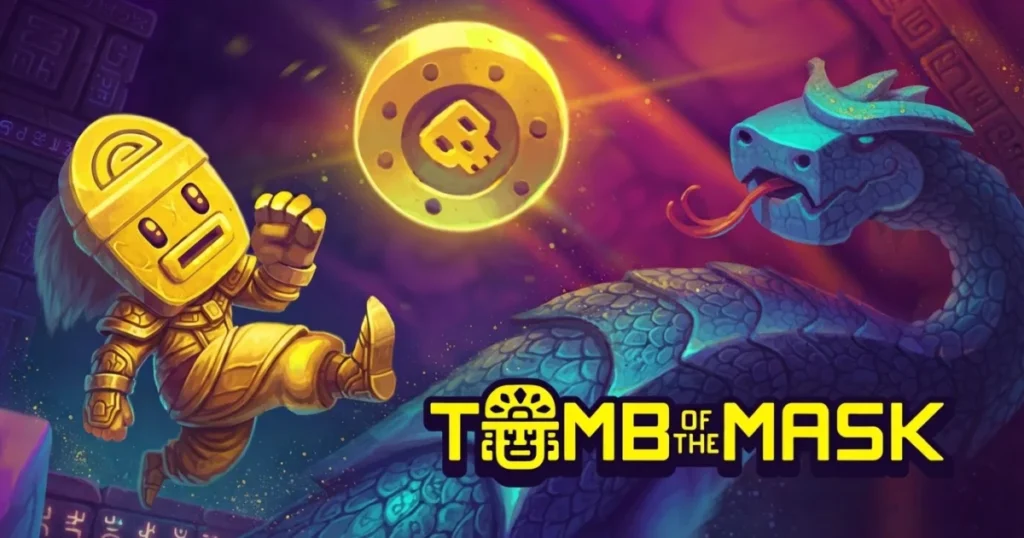












Tomb of the Mask drops you into a vertical maze where one swipe sends you rocketing across walls until you slam into something solid. You find a strange mask deep underground that gives you the power to cling to any surface and dash in four directions. Collect coins, dodge spikes and enemies, and race against rising lava in this retro arcade game. The neon pixel art and chiptune sound give it a classic arcade feel, but the swipe-to-dash movement creates a modern reflex challenge that keeps you coming back for one more run.
Table of Contents+
What Is Tomb of the Mask?
Tomb of the Mask is a vertical arcade platformer that blends Pac-Man-style coin collection with fast-paced maze navigation. You control a character wearing a magical mask that lets you dash across walls, floors, and ceilings in straight lines. Each room is a small puzzle you solve at high speed, grabbing coins and stars while avoiding traps and enemies. The game offers two main modes: Map mode with set stages and three stars per level, and Arcade mode where you climb an endless procedurally generated tower while lava chases you from below.
Swipe-to-Dash Movement
The core mechanic is simple but demands precision. Swipe in any direction and your character slides that way until hitting a wall. You can’t stop mid-dash, so every move requires planning. This creates a rhythm where you scan the room, plot your path, and commit to each swipe. One wrong move sends you into a spike or enemy, ending your run instantly.
Map Mode and Arcade Mode
Map mode gives you hundreds of handcrafted stages, each with exactly three stars to collect. You can take your time, plan routes, and replay levels for perfect clears. Arcade mode flips the script: you climb an endless vertical tunnel while danger rises from below. Speed and reflexes matter more than careful planning, and your score climbs the higher you travel. Both modes share the same controls and enemies, but they feel completely different to play.
Enemies and Traps
Every obstacle in the tomb follows a pattern you can learn. Bats fly back and forth on fixed paths, snakes patrol short routes and turn at walls, and spikes pop in and out on a rhythm. Dart traps fire across set lanes, and saw blades spin along grooves in the floor. Watch any trap for one full cycle before you commit to a dash, and even the toughest rooms start to feel fair. Learning enemy behavior is the real skill check.
Masks and Power-Ups
Coins you collect fuel the in-game shop, where you unlock different masks with unique perks. Some pull in extra coins, others boost power-up duration or reset traps. Power-ups drop inside the maze too: shields tank one hit, magnets vacuum coins toward you, and freeze stops enemies for a few seconds. Save freeze for crowded rooms full of bats and spikes, and you’ll climb much higher in Arcade runs.
Stars, Coins, and Scoring
Every stage in Map mode hides exactly three stars, and grabbing all of them is the gold standard. Coins boost your shop wallet, while dots fill a combo meter that rewards quick, uninterrupted dashes. In Arcade mode, your score climbs the higher you travel, with bonus points for streaks and chest pickups. Missing a star doesn’t lock you out of the next level, but you’ll want to replay for a full clear if you’re chasing 100%.
How to Play Tomb of the Mask
Getting started is straightforward. Open the game page, wait a couple seconds for the maze to load, and you’re in. Pick Map mode if you want a calmer warm-up with set levels, or jump straight into Arcade if you’re hunting a high score. There’s no tutorial wall of text, just go. The controls are simple enough that you can start playing in seconds, but mastering the timing and patterns takes practice.
Tomb of the Mask Controls
On desktop, use the arrow keys (Up, Down, Left, Right) to dash in any direction. Your character moves in the chosen direction until hitting a wall, so plan each move before you commit. On mobile, swipe across the screen the way you want to go. Tap the pause icon to check the shop, restart a stage, or browse your power-ups. That’s the whole control scheme, which is part of why kids pick it up so quickly.
Browser Compatibility
Tomb of the Mask runs smoothly in Chrome, Edge, and Firefox on any modern laptop or desktop. The game loads quickly and plays without lag on standard hardware. You can also play on mobile browsers with touch controls, making it easy to jump in from any device.
Tips and Tricks for Tomb of the Mask
Scan before you swipe: Look at the entire room before making your first move. Identify safe paths, coin clusters, and trap patterns so you can plan two or three dashes ahead instead of reacting on the fly.
Learn enemy cycles: Every enemy and trap follows a predictable pattern. Bats fly back and forth on fixed lines, spikes pop in and out on a beat, and dart traps fire across set lanes. Watch for one full cycle before you commit to a dash through their path.
Use walls to dodge: The mask lets you stick to walls and change direction instantly. If an enemy is blocking your path, dash to a side wall, wait for them to pass, then continue. This trick works especially well against snakes that patrol short routes.
Save power-ups for tight spots: Don’t waste shields and freeze power-ups on easy rooms. Hold them for sections with multiple traps or enemies blocking the exit. A well-timed freeze can clear a path through a room that looks impossible.
Prioritize stars over speed in Map mode: Smart routing matters more than raw speed when you’re chasing three-star clears. Some stars sit in side pockets off the main path, so plan your route to grab them all before heading to the exit.
Where to Play Tomb of the Mask
You can play Tomb of the Mask free online right now on Arcazi.com. It runs directly in your browser with no download, no install, and no account required. Just open the page and start playing. The game works on any modern device with a web browser, whether you’re on a laptop, desktop, or mobile.
Also available on the App Store for iOS.
Also available on Google Play for Android.
Common Questions About Tomb of the Mask
Is Tomb of the Mask free?
Yes, Tomb of the Mask is free to play online. You can access the full game in your browser without paying anything. The mobile versions on iOS and Android may include optional in-app purchases, but the core gameplay is free.
For Parents
Tomb of the Mask is a fast-paced arcade game with no violent or mature content. The gameplay involves navigating mazes and avoiding cartoon traps like spikes and enemies, but there’s no blood, combat, or scary imagery. The bright pixel art and simple mechanics make it accessible for younger players, though the reflex-based gameplay can be challenging. The game rewards quick thinking and pattern recognition, which can help develop problem-solving skills.
More Games Like Tomb of the Mask
If you enjoy the fast reflex gameplay and arcade challenge, these games offer similar experiences:
- Jetpack Joyride – Fly through a lab dodging lasers and missiles in this endless runner with power-ups and upgrades.
- Temple Run – Sprint through ancient ruins, swipe to turn and jump, and see how far you can run before the temple catches you.
- Stickman Boost – Race a stickman through obstacle courses with jumps, flips, and speed boosts in this fast platformer.
- Tube Jumpers – Bounce on inner tubes and knock opponents into the water in this chaotic multiplayer party game.
- Completing the Mission – Make choices to guide a stick figure through heists and escapes in this interactive adventure.
- Raft Wars – Launch projectiles from a raft to defeat enemies and protect your treasure in this turn-based shooter.
- Stickman Dismounting – Launch a stickman down ramps and watch the physics-based crashes in this ragdoll simulator.
These games deliver quick Arcade thrills with simple controls and challenging gameplay.
FAQs About Tomb of the Mask
Is Tomb of the Mask offline?
The browser version on Arcazi.com requires an internet connection to load. Once loaded, it may work briefly offline, but you’ll need to be online to start playing. The mobile app versions may offer offline play after the initial download.
How many levels are in Tomb of the Mask?
Map mode contains hundreds of handcrafted stages, each with three stars to collect. The exact number varies by version, but most players report over 200 levels. Arcade mode is endless, so you can keep climbing as long as you survive.
How to beat level 133 on Tomb of the Mask?
Level 133 requires careful timing and route planning. Watch the spike patterns for one full cycle before you move, and prioritize grabbing the stars in side pockets before heading to the exit. Use walls to pause and wait for enemies to pass, then dash through when the path is clear.
How to beat level 127 on Tomb of the Mask?
Level 127 features tight corridors with dart traps and moving enemies. Plan your route to collect all three stars without backtracking. Wait for dart traps to fire, then dash through immediately after. Use the freeze power-up if you have one to stop enemies and create a safe window.
What tomb of the mask levels have saws?
Saw blades appear in later stages of Map mode, typically starting around level 50 and becoming more common as you progress. They spin along grooves in the floor and walls, forcing you to time your dashes carefully. Arcade mode also includes saws at higher altitudes.
How old is Tomb of the Mask?
Tomb of the Mask was originally released as a mobile game in 2016. The browser version came later, making the arcade gameplay accessible on desktop and laptop devices.
Does Tomb of the Mask need wifi?
The browser version on Arcazi.com needs an internet connection to load the game initially. The mobile app versions may allow offline play after you’ve downloaded them, but you’ll need wifi or data to install updates and access certain features.
How to play Tomb of the Mask on Chromebook?
Open your Chromebook’s browser, navigate to Arcazi.com, and load the game page. Use the arrow keys to control your character. The game runs smoothly on Chromebooks without any special setup or extensions.
How to get story mode in Tomb of the Mask?
Story mode is another name for Map mode, which is available from the main menu. Tap or click the Map icon to access the level-based progression with set stages and three stars per level. If you’re playing the mobile version, make sure you’ve updated to the latest version.
Can you skip levels in Tomb of the Mask?
Map mode requires you to complete levels in order to unlock the next stage. You can’t skip ahead without finishing the current level. However, you don’t need to collect all three stars to progress, just reach the exit.
How to activate shield in Tomb of the Mask?
Shields activate automatically when you collect them during a run. Once active, the shield icon appears on your character and absorbs one hit from an enemy or trap. You don’t need to press any button to use it, it triggers the moment you take damage.
How to score high in Tomb of the Mask?
In Arcade mode, climb as high as possible without stopping. Collect every coin and dot you can to build combo streaks, and grab chests for bonus points. Use power-ups like magnets to pull in coins you’d otherwise miss, and save shields for moments when you’re surrounded by traps.
Start Your Tomb of the Mask Run Now
Tomb of the Mask is free to play right now on Arcazi.com. No download, no install, just open your browser and start dashing through mazes. See how high you can climb in Arcade mode or chase three-star clears in Map mode.