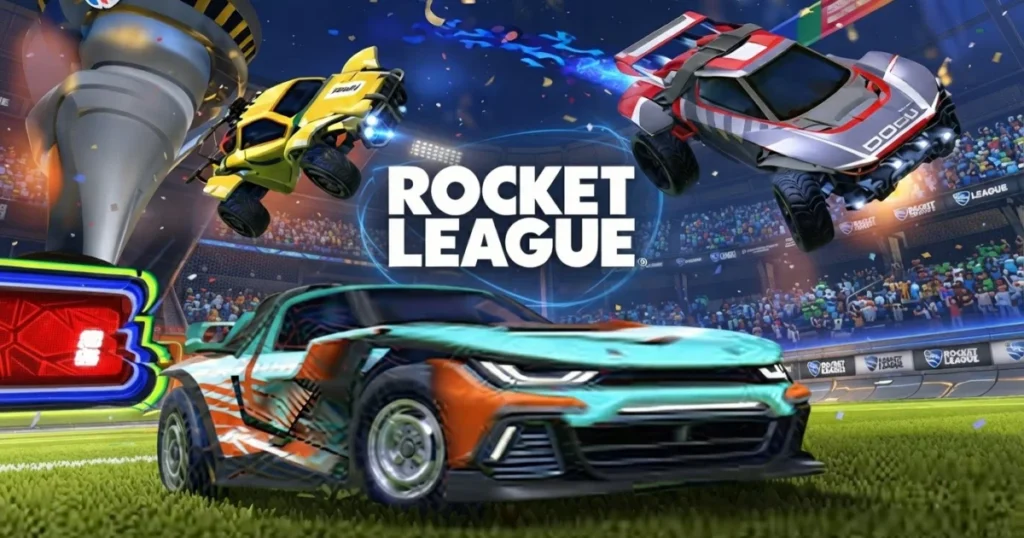









Rocket League combines high-speed vehicular action with soccer in a physics-driven arena where rocket-powered cars replace traditional players. Developed by No Pressure Studios and released in February 2020, this browser-based version brings the core competitive experience to your screen without downloads. Matches demand precision timing, boost management, and aerial control as you flip, drift, and fly across the field to score goals against opponents.
Table of Contents+
- What Is Rocket League?
- How to Play Rocket League?
- Game Modes and Competitive Play
- Customization and Personalization
- The Rocket League Community and Ecosystem
- Getting Started and Advanced Tips
- Where to Play Rocket League
- More Soccer Games You’ll Enjoy
- For Parents
- FAQs About Rocket League
- Start Your Rocket League Journey
What Is Rocket League?
Rocket League strips soccer down to its competitive core and rebuilds it with rocket-powered vehicles. Two teams battle in fast-paced matches where cars replace players, boost replaces stamina, and aerial maneuvers replace headers. Physics govern every collision, making ball control a skill that rewards practice and prediction.
The game runs on HTML5 and Unity technology, delivering smooth 3D graphics and responsive controls directly in your browser. Matches unfold in real time, with each team racing to outscore opponents before the clock expires. Vehicle customization lets you personalize your ride, while competitive modes track your rank across seasons.
Cross-platform play connects browser players with the broader Rocket League ecosystem. Tournaments, seasonal challenges, and ranked playlists keep the competition fresh. The Rocket League Wiki documents every game mode, vehicle stat, and competitive tier for players seeking deeper knowledge.
How to Play Rocket League?
Matches begin with both teams spawning at opposite ends of the arena. Your car starts with a small boost reserve, which refills by driving over glowing boost pads scattered across the field. The ball sits at center field, and the first team to reach it gains early possession advantage.
Scoring requires hitting the ball into the opponent’s goal using your car’s front, sides, or roof. Contact angle and speed determine ball trajectory, so positioning matters as much as timing. Matches run for five minutes, with overtime triggering if the score remains tied when regulation ends.
Defensive play involves clearing the ball from your half, blocking shots, and rotating positions with teammates. Offensive strategies focus on passing plays, wall shots, and aerial strikes. Boost management separates good players from great ones, as running dry leaves you vulnerable and slow.
Mastering Controls and Keybinds
Arrow keys handle steering and forward/reverse movement, giving you directional control across the arena. Spacebar triggers jumps, which can be chained into flips by pressing jump again mid-air while holding a direction. Mouse controls aim your camera and toggle ball cam, keeping the ball centered in your view regardless of car orientation.
WASD keys offer an alternative movement scheme preferred by some keyboard players. Shift activates drift, letting you slide through tight turns without losing momentum. Right-click toggles ball cam on and off, useful when collecting boost or lining up demolitions.
Controller players typically map boost to a shoulder button, jump to a face button, and drift to another trigger. Custom keybinds let you optimize for your playstyle, whether you prioritize quick aerials or ground dribbling. The game runs smoothly in Chrome, Edge, and Firefox without performance drops.
Core Mechanics: Boost, Jump, and Aerials
Boost propels your car at maximum speed and enables aerial flight when activated mid-air. Small boost pads grant 12% boost each, while large corner pads refill your tank to 100%. Managing boost economy means knowing when to grab pads versus conserving fuel for critical plays.
Jumping launches your car upward, and double-jumping adds height for aerial challenges. Flipping by holding a direction during your second jump adds speed and power to shots. Front flips accelerate you forward, side flips adjust trajectory, and back flips can surprise defenders with unexpected angles.
Aerial maneuvers require boosting while airborne and tilting your car to meet the ball at height. Successful aerials demand predicting ball trajectory, managing boost consumption, and landing cleanly to maintain momentum. Drifting on landing preserves speed and lets you chain moves without stopping.
Game Modes and Competitive Play
Standard 3v3 matches form the core competitive experience, balancing team coordination with individual skill. 2v2 playlists emphasize positioning and rotation, as one mistake leaves your goal exposed. 1v1 duels test pure mechanical skill, removing team support and exposing every error.
Casual playlists let you practice without rank pressure, while competitive modes assign MMR (Matchmaking Rating) based on wins and losses. Tournaments run on scheduled intervals, offering cosmetic rewards for top finishers. Extra modes like Rumble add power-ups, and Hoops replaces goals with basketball nets.
Ranked play spans multiple playlists, each tracking separate MMR. Players climb from Bronze through Silver, Gold, Platinum, Diamond, Champion, and Grand Champion tiers. Season rewards grant exclusive items based on your highest rank achieved before the season resets.
Ranking System and Seasons
MMR determines your competitive rank, increasing with wins and decreasing with losses. Each rank tier contains three divisions, requiring consistent performance to advance. Placement matches at season start establish your initial rank based on previous performance and current skill.
2v2 MMR operates independently from 3v3 and 1v1 ratings, letting you specialize in preferred playlists. Average rank in 2v2 hovers around Gold III, with most players clustering between Gold I and Platinum II. Grand Champion represents the top 0.3% of the player base.
Seasons last several months, introducing new cosmetics, challenges, and competitive rewards. Season 20 added fresh tournament structures and adjusted rank distribution. Seasonal progression tracks your wins, goals, and MVPs, unlocking tier rewards as you accumulate points.
Customization and Personalization
Vehicle customization spans body types, decals, wheels, boosts, and toppers. Each car body features unique hitbox dimensions affecting ball contact and aerial control. Octane remains the most popular choice for its balanced hitbox, while Dominus offers a flatter, longer profile.
Decals change your car’s paint scheme, ranging from simple colors to animated designs. Wheels alter appearance without affecting performance, letting you express style without gameplay compromise. Boost trails leave visual effects as you accelerate, and goal explosions celebrate scores with flashy animations.
Cosmetic items drop after matches or unlock through seasonal progression. Trading systems let players exchange duplicate items, though browser versions may limit certain marketplace features. Customization purely affects visuals, ensuring competitive balance remains intact.
The Rocket League Community and Ecosystem
Rocket League’s competitive scene spans grassroots tournaments to professional esports leagues. Regional championships attract top teams competing for prize pools and circuit points. Streaming platforms host daily broadcasts of high-level play, showcasing advanced techniques and strategic innovations.
Community resources include training packs, replay analysis tools, and mechanical drills shared across forums. The Ultimate Pop Culture Wiki archives the game’s cultural impact and competitive history. Discord servers organize pickup games, coaching sessions, and tournament signups.
Cross-platform play unites browser, console, and PC players in shared matchmaking pools. This ecosystem ensures quick queue times and diverse competition regardless of platform. Community-created content ranges from custom training scenarios to highlight montages celebrating spectacular plays.
Getting Started and Advanced Tips
New players should prioritize boost management over flashy aerials. Staying grounded with full boost beats attempting risky aerial challenges that leave you stranded. Practice power slides to maintain speed through turns, and learn to half-flip for quick recoveries.
Ball cam should stay active most of the time, toggling off only when collecting boost or demolishing opponents. Rotation matters more than mechanical skill at lower ranks, as proper positioning prevents defensive breakdowns. Shadow defense, where you match opponent speed while facing your goal, stops most ground attacks.
Advanced techniques include fast aerials (jumping and boosting simultaneously), wave dashing (flipping into the ground for speed), and ceiling shots (dropping from the arena ceiling for unpredictable angles). Training mode lets you drill specific scenarios without match pressure. Focus on consistency before attempting freestyle tricks, as reliable fundamentals win more games than occasional highlight plays.
Where to Play Rocket League
Play Rocket League free right now on Arcazi.com in your browser with no download required. Also available on Google Play for Android. Also available on the App Store for iOS.
More Soccer Games You’ll Enjoy
- Football Bros – Arcade soccer with power-ups and fast-paced 2v2 matches that reward quick reflexes.
- Car Football – Vehicular soccer with simplified controls perfect for quick browser sessions.
- Football Legends 2016 – Head-to-head soccer featuring special moves and tournament brackets.
- Football Legends – Classic soccer action with iconic players and competitive multiplayer modes.
- Sports Heads Soccer – Big-headed soccer with physics-based gameplay and local multiplayer support.
- Volley Random – Randomized volleyball mechanics that keep every match unpredictable and entertaining.
These titles expand on competitive sports gameplay, and you can explore more options in our Soccer collection.
For Parents
Rocket League features competitive sports gameplay with no violent content, mature themes, or inappropriate language. Matches focus on vehicular soccer mechanics where cars bump and collide within arena boundaries. Online multiplayer exposes players to chat features, which can be disabled in settings if preferred. The physics-based gameplay rewards skill development and strategic thinking without exposing children to harmful material.
FAQs About Rocket League
How rocket league ranks work?
Ranks increase when you win competitive matches and decrease with losses, adjusting your MMR within Bronze through Grand Champion tiers. Each rank contains three divisions, and consistent performance moves you between them based on match outcomes.
How rocket league mmr works?
MMR (Matchmaking Rating) is a hidden number that rises with wins and falls with losses, determining your visible rank. Each playlist tracks separate MMR, so your 2v2 rating operates independently from 3v3 or 1v1 rankings.
How rocket league was made?
No Pressure Studios developed this browser version using HTML5 and Unity technology, releasing it in February 2020. The game adapts core Rocket League mechanics for web play without requiring downloads or installations.
What rocket league season is it?
Season numbers update every few months with new cosmetics, challenges, and rank resets. Check the main menu for current season details and remaining time before the next competitive reset.
What rocket league tournaments are today?
Tournaments run on scheduled intervals throughout each day, visible in the tournament menu with start times and entry requirements. Competitive brackets award cosmetic items and titles to top finishers.
What rocket league playlist is all i need in?
The song “All I Need” typically appears in menu music rotations or special event playlists. Audio settings let you adjust music volume or disable tracks if preferred.
What rocket league rank is jynxzi?
Individual player ranks fluctuate based on recent performance and are not tracked in this guide. Competitive leaderboards display top-ranked players if you want to check current standings.
Can I play Rocket League with a controller?
Browser versions support keyboard and mouse controls optimized for web play. Controller compatibility depends on your browser’s gamepad API support, though keyboard remains the primary input method for this version.
How do I improve my aerial game?
Practice fast aerials by jumping and boosting simultaneously, then tilt your car to meet the ball at height. Training mode lets you repeat aerial scenarios until muscle memory develops for consistent contact.
What’s the best car for beginners?
Octane offers a balanced hitbox suitable for learning all mechanics without specialization drawbacks. Its rounded shape forgives positioning errors and handles both ground play and aerials effectively.
How does boost management affect gameplay?
Running out of boost leaves you slow and unable to challenge aerial balls or recover quickly. Prioritize grabbing small pads during rotations to maintain reserves for critical offensive and defensive plays.
Can I save my progress between sessions?
Browser versions typically save progress through cookies or account systems. Check the settings menu for login options that preserve your rank, cosmetics, and statistics across devices.
Start Your Rocket League Journey
Jump into Rocket League instantly on Arcazi.com with no downloads or installations required. Compete in ranked matches, master aerial mechanics, and climb the competitive ladder directly in your browser.