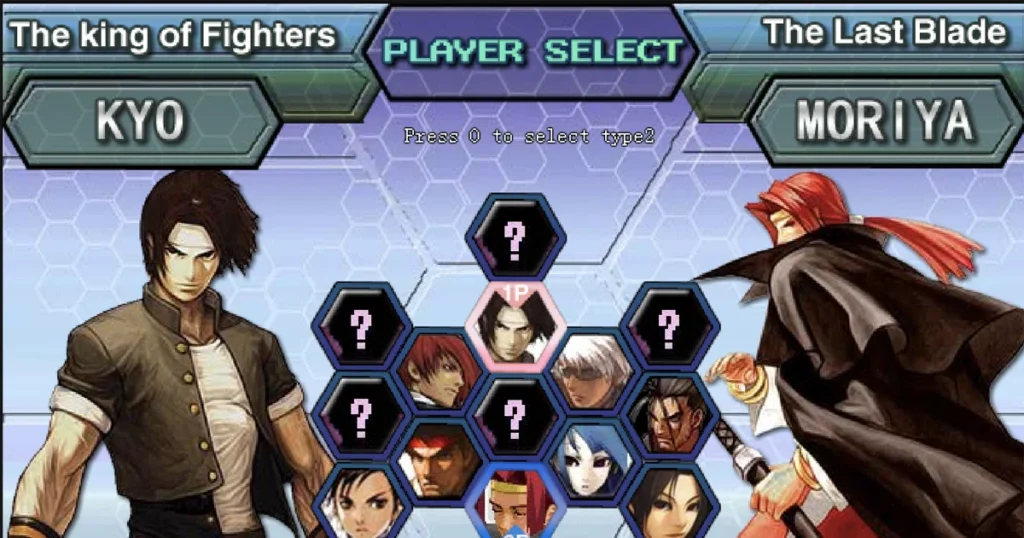





Arcazi.com brings you King Of Fighters, the legendary SNK arcade fighter that launched in 1994 and built a massive following through its tournament-style team battles and technical combo system. This browser edition preserves the classic 2D fighting mechanics while adding crossover characters from both the King Of Fighters universe and Street Fighter, including Ryu, Chun Li, Terry, Kyo, Iori, and Orochi. You’ll face waves of opponents in single-player mode, mastering special move inputs, power gauge management, and combo cancels to climb the ranks. The game runs smoothly through Flash emulation via Ruffle, delivering the same frame-perfect timing and strategic depth that made the original a staple of competitive fighting game scenes worldwide.
Table of Contents+
- What Is King Of Fighters?
- How to Play King Of Fighters?
- Iconic Character Roster and Fighting Archetypes
- Combat Systems and Meter Management Mechanics
- Game Modes and Adjustable Difficulty Settings
- Advanced Competitive Strategies and Defense Techniques
- Where to Play King Of Fighters
- More Classic Fighters to Try
- For Parents
- FAQs About King Of Fighters
- Start Your Tournament Run Now
What Is King Of Fighters?
King Of Fighters is a 2D arcade fighting game that combines SNK’s most iconic characters into a tournament bracket where you select fighters and battle through increasingly difficult opponents. The series debuted in 1994 and became known for its team-based structure, where players choose multiple characters and switch between them during matches. This browser version maintains the core mechanics of the franchise while incorporating crossover fighters from Street Fighter, creating a unique roster that blends two legendary fighting game universes. Each character brings distinct fighting archetypes, from rushdown strikers to zoning specialists, and the game rewards players who learn frame data, spacing, and meter optimization.
The combat system revolves around three attack buttons for light, medium, and heavy strikes, plus a dedicated button for throws and evasive rolls. Matches unfold on flat 2D stages with health bars at the top, a timer counting down each round, and power gauges that fill as you land attacks or take damage. Victory requires either depleting your opponent’s health bar or having more health remaining when time expires.
The game’s depth comes from its special move execution, which uses directional inputs combined with attack buttons to unleash powerful techniques, and its combo cancel system, which lets you interrupt normal attacks into special moves for extended damage strings. SNK’s King of Fighters series has evolved over decades, but this browser edition captures the essential formula that defined the franchise.
How to Play King Of Fighters?
Gameplay centers on one-on-one matches where you control a fighter using directional inputs for movement and multiple buttons for attacks, blocks, and special techniques. Rounds last until one fighter’s health bar empties or the timer runs out, with best-of-three rounds determining the winner. Between matches, you can adjust difficulty settings to scale opponent aggression and reaction speed, making the game accessible for newcomers while still challenging veterans. The single-player mode progresses through a series of opponents, each with unique move sets and AI patterns you’ll need to study and counter.
Desktop Keybindings and Movement Controls
Arrow keys handle all movement: left and right for walking, down for crouching, and up for jumping. Holding back while standing blocks high and mid attacks, while holding down-back blocks low attacks and prevents throws. The WASD keys can be remapped in the settings menu for alternative movement schemes. Attack buttons are typically mapped to A, S, D for light, medium, and heavy punches, with Z, X, C for light, medium, and heavy kicks. The Shift key activates your character’s evasive roll, which grants brief invincibility frames and helps you escape corner pressure or close distance safely.
Special moves require directional inputs combined with attack buttons, following the classic quarter-circle, half-circle, and charge motion patterns from arcade fighting games. For example, a quarter-circle forward (down, down-forward, forward) plus punch executes a fireball projectile for characters like Ryu, while a dragon punch motion (forward, down, down-forward) plus punch performs an invincible anti-air attack. The game runs smoothly in Chrome, Edge, and Firefox, with responsive input detection that registers even fast combo sequences without dropped inputs.
Touchscreen Inputs and Mobile Gesture Controls
Mobile play uses on-screen virtual buttons that mirror the desktop layout, with a directional pad on the left side of the screen and attack buttons arranged on the right. Tap the directional pad to move, crouch, or jump, and tap attack buttons to execute strikes. Holding the back direction on the virtual pad blocks incoming attacks, while double-tapping forward dashes your character across the screen. Special moves work the same way as desktop controls, requiring you to input directional sequences on the virtual pad followed by an attack button tap.
Swipe gestures are not used in this game; all inputs rely on tapping the virtual buttons. The touchscreen layout adapts to different screen sizes, scaling the button zones to fit tablets and phones without overlapping or creating dead zones. Because fighting games demand precise timing, mobile players should practice special move inputs in training mode to build muscle memory for the virtual controls before jumping into competitive matches.
Iconic Character Roster and Fighting Archetypes
The roster features legendary SNK characters like Kyo Kusanagi, a balanced rushdown fighter with flame-based special moves and strong combo potential; Iori Yagami, an aggressive striker with fast normals and command grabs; and Terry Bogard, a well-rounded brawler with projectile control and powerful counter-hit punishes. Crossover additions from Street Fighter include Ryu, whose fireball and dragon punch define the classic zoning archetype, and Chun Li, a speed-focused character with rapid multi-hit kicks and air mobility. Orochi represents the boss-tier characters, bringing overwhelming damage output and unique move properties that challenge players to adapt their strategies mid-match.
Each fighter belongs to a specific archetype that dictates their optimal playstyle. Rushdown characters like Iori excel at close-range pressure, using fast normals and frame traps to keep opponents blocking and create throw opportunities. Zoning characters like Ryu control space with projectiles and anti-air moves, forcing opponents to navigate a minefield of fireballs to close distance. Grapplers focus on command throws that deal massive damage and bypass blocking, rewarding players who can read opponent movement patterns and land grabs during recovery frames. Understanding your character’s archetype and how it matches up against your opponent’s is critical for success in higher difficulty settings and competitive play.
The King of Fighters Wiki documents every character’s move list and frame data, offering a deep resource for players who want to master specific fighters. The browser version includes a character select screen where you can preview each fighter’s appearance and basic stats before committing to a match, helping you experiment with different archetypes until you find the one that matches your preferred playstyle.
Combat Systems and Meter Management Mechanics
The power gauge system sits at the heart of King Of Fighters’ strategic depth, filling gradually as you land attacks, take damage, or have your attacks blocked. The gauge is divided into segments, with most characters able to store up to three full segments at maximum capacity. Spending one segment lets you perform an EX special move, an enhanced version of a standard special that deals more damage, has faster startup frames, or gains additional properties like armor or extended range. Spending multiple segments unlocks super moves, cinematic attacks that deal devastating damage and can turn the tide of a match if landed during a combo or as a punish.
Power Gauges and MAX Mode Activation
MAX Mode is a temporary power state activated by pressing two attack buttons simultaneously when you have at least one full gauge segment stored. Entering MAX Mode drains your gauge over time but grants access to faster movement speed, increased damage on all attacks, and the ability to cancel special moves into other special moves, creating extended combo routes impossible in normal state. The mode lasts several seconds, and skilled players use it to convert stray hits into full combos or to apply overwhelming pressure that forces opponents into defensive mistakes.
Managing your gauge segments requires constant decision-making. Spending a segment on an EX move might secure a round-winning combo, but it also leaves you without meter for a defensive super that could save you from your opponent’s offense. Holding onto full gauge gives you the threat of a super move, which can deter opponents from committing to risky attacks, but failing to spend meter means you’re not maximizing your damage output. Top players balance offensive and defensive meter usage, spending aggressively when they have life lead and conserving meter when they need comeback potential.
Special Move Execution and Combo Cancels
Special moves use motion inputs that require precise directional sequences followed by an attack button. Quarter-circle forward motions (down, down-forward, forward plus punch or kick) produce projectiles or advancing attacks, while quarter-circle back motions (down, down-back, back plus punch or kick) often trigger counter moves or defensive specials. Dragon punch motions (forward, down, down-forward plus punch) execute invincible anti-air attacks that beat jump-ins cleanly, and charge moves require holding back or down for two seconds before pressing forward or up plus an attack button.
Combo cancels let you interrupt the animation of a normal attack by inputting a special move before the normal attack’s recovery frames begin. For example, landing a crouching medium kick can be canceled into a quarter-circle forward fireball, linking the two moves into a true combo that the opponent cannot block between hits. Cancel windows vary by character and normal attack, with light attacks generally having tighter cancel windows than heavy attacks.
Mastering cancels transforms your character from throwing out single pokes into executing multi-hit strings that chunk health bars and build meter rapidly. Advanced players use MAX Mode to cancel special moves into other special moves, creating loops that carry opponents from midscreen to the corner while dealing 40% or more damage off a single confirm.
Game Modes and Adjustable Difficulty Settings
Single-player mode is the primary game mode, pitting you against a series of AI opponents that increase in difficulty as you progress through the bracket. Early matches feature opponents with predictable patterns and slow reaction times, allowing you to practice special move execution and basic combos without intense pressure. Mid-tier opponents start using advanced techniques like frame traps, throw mixups, and meter-based punishes, forcing you to tighten your defense and recognize when to block versus when to counter-attack. Final bracket opponents and boss characters employ near-perfect execution, reading your inputs and punishing mistakes with devastating combos that can end rounds in seconds.
The difficulty settings menu lets you scale opponent AI aggression, reaction speed, and damage output across multiple tiers. Lower difficulty settings reduce the AI’s combo execution and make them more susceptible to repeated tactics, ideal for learning character move sets and practicing special move inputs without constant interruption. Higher difficulty settings turn the AI into a relentless opponent that blocks most attacks, punishes whiffed moves instantly, and executes optimal combos off every confirm. These settings also adjust how much damage both you and the AI deal, with some configurations creating glass-cannon scenarios where every hit matters and others allowing longer, more forgiving exchanges.
Customizable control settings appear in the options menu, where you can remap every button to match your preferred layout or accommodate different keyboard configurations. The game saves your control scheme between sessions, so you don’t need to reconfigure inputs every time you load the browser. This flexibility makes the game accessible whether you’re playing on a laptop with a compact keyboard or a desktop with a full mechanical board and plenty of macro keys.
Advanced Competitive Strategies and Defense Techniques
Spacing control separates intermediate players from advanced competitors by creating whiff punish scenarios. Positioning yourself just outside an opponent’s reach forces them to miss, leaving them stuck in recovery frames where they cannot block. Characters with long reach, like Ryu or Chun-Li, excel at baiting opponents into committing to these unsafe attacks.
Blocking in fighting games serves as an active counter-strategy. High blocks stop jumping and standing attacks, while low blocks guard against crouching attacks. Observing an opponent’s patterns allows you to predict mixups and switch stances preemptively. Many heavy or special attacks leave the attacker unsafe on block, opening a brief frame window to interrupt their recovery with a fast combo.
Baiting creates false vulnerabilities to trick opponents into making mistakes:
-
Baiting Attacks: Moving forward and immediately blocking prompts an opponent to throw out a risky move that you can easily punish.
-
Empty Jumps: Jumping without attacking baits out unsafe anti-air moves or tricks an opponent into blocking high, setting up an immediate throw upon landing.
Exploiting punish windows maximizes damage output. Light attacks recover too quickly to counter, but heavy normals, special moves, and supers carry substantial recovery penalties. Memorize your character’s fastest frame starters—typically crouching light attacks—to punish tight windows, and use heavy normals canceled into special moves for maximum damage on larger whiffed attacks.
Where to Play King Of Fighters
You can play King Of Fighters free right now on Arcazi.com in your browser, with no download or installation required. Also available on Google Play for Android. Also available on the App Store for iOS.
More Classic Fighters to Try
- Wrestle Bros – Chaotic multiplayer brawler where you grapple, throw, and slam opponents in physics-driven wrestling matches.
- Tag Team Wrestling – Retro arcade wrestling with tag mechanics, letting you swap partners mid-match and execute devastating team combos.
- Stickman Fighter – Fast-paced stick figure combat with martial arts moves, weapon pickups, and wave-based survival challenges.
- Stickman Destruction – Ragdoll physics fighter where you launch stickmen into hazards and rack up damage through brutal environmental kills.
- Gang Fall Party – Multiplayer party brawler with elimination rounds, obstacle courses, and last-player-standing showdowns.
- Fnaf World – RPG adventure featuring animatronic characters in turn-based battles with party management and exploration elements.
These titles join a growing collection of combat and competition games in the Fighting category, offering everything from technical 2D fighters to physics-based party brawlers.
For Parents
King Of Fighters is a competitive fighting game featuring hand-to-hand combat between human and fantasy characters, with no blood, graphic violence, or mature themes. Matches involve punching, kicking, and special energy-based attacks that deplete health bars, but defeated characters simply fall or disappear without injury detail. The game focuses on skill-based competition and strategic gameplay rather than realistic violence, making it comparable to other arcade fighting games in tone and content. Parents should note that the game’s difficulty settings can be adjusted to reduce frustration for younger players still learning combo execution and defensive techniques.
FAQs About King Of Fighters
How to play king of fighters 2002?
King of Fighters 2002 uses the same control scheme as this browser version, with arrow keys for movement, attack buttons for strikes, and motion inputs for special moves. The 2002 edition introduced refined combo mechanics and stricter input timing, but the core gameplay of blocking, spacing, and meter management remains identical across versions.
How to play king of fighters?
Use arrow keys to move your character, attack buttons to strike, and combine directional inputs with attack buttons to execute special moves. Block by holding back, build your power gauge by landing attacks, and spend meter on EX moves or super attacks to maximize damage during combos.
How to play king of fighters on pc?
This browser version runs directly on PC through Chrome, Edge, or Firefox with no download required. Use your keyboard for all inputs, with arrow keys controlling movement and customizable attack buttons handling strikes, or connect a USB gamepad and remap controls in the settings menu for a more authentic arcade experience.
How to play king of fighters 97?
King of Fighters 97 shares the same fundamental controls and mechanics as this browser edition, including quarter-circle motion inputs for special moves and power gauge management. The 97 version featured the Advanced and Extra mode system, but the core combat of blocking, combo cancels, and spacing translates directly to this version.
How to play king of fighters 97 on pc?
The browser version on Arcazi.com provides the same gameplay experience as King of Fighters 97, running on PC through Flash emulation via Ruffle. All keyboard controls work identically, and the game preserves the frame-perfect timing and combo execution that defined the 97 edition.
How to play king of fighters 98?
King of Fighters 98 uses the same control layout and special move inputs as this browser version, with emphasis on balanced character matchups and refined combo systems. Practice quarter-circle and dragon punch motions in training mode, learn your character’s optimal combos, and focus on spacing control to dominate matches.
Can I play King Of Fighters with a controller?
Yes, you can connect a USB gamepad to your PC and remap all controls in the settings menu to match your controller layout. Most modern controllers are recognized automatically by the browser, and button remapping lets you assign attack buttons, movement, and special inputs to any stick or button configuration you prefer.
How do I perform super moves in King Of Fighters?
Super moves require at least one full power gauge segment and a specific motion input, usually a double quarter-circle forward or half-circle motion combined with an attack button. The exact input varies by character, but all supers consume meter and deal significantly more damage than standard special moves, making them ideal for finishing combos or punishing blocked attacks.
What is MAX Mode and when should I use it?
MAX Mode is activated by pressing two attack buttons simultaneously when you have meter stored, granting increased damage, faster movement, and the ability to cancel special moves into other special moves. Use it to extend combos beyond normal limits, apply overwhelming pressure, or convert stray hits into full damage sequences that can swing rounds in your favor.
How do I unlock more characters in King Of Fighters?
This browser version provides access to the full roster from the start, with no unlocking required. All characters, including crossover fighters from Street Fighter and boss characters like Orochi, are available on the character select screen before each match, letting you experiment with different archetypes immediately.
Does King Of Fighters have a 2-player mode?
This browser edition focuses on single-player matches against AI opponents, with no local or online multiplayer functionality. You can adjust difficulty settings to simulate competitive play, but head-to-head matches against another human player are not supported in this version.
How do I improve my combo execution in King Of Fighters?
Practice special move inputs in isolation until you can execute them consistently, then work on linking normal attacks into those specials by canceling the normal’s animation before recovery frames begin. Start with simple two-hit combos like crouching medium kick into fireball, then gradually add more hits by incorporating jump-ins, multiple normals, and meter-based extensions once your cancel timing becomes reliable.
Start Your Tournament Run Now
King Of Fighters is free to play instantly in your browser on Arcazi.com, with no download, no installation, and no account required. Jump into single-player mode, pick your fighter, and test your skills against the legendary SNK roster right now.