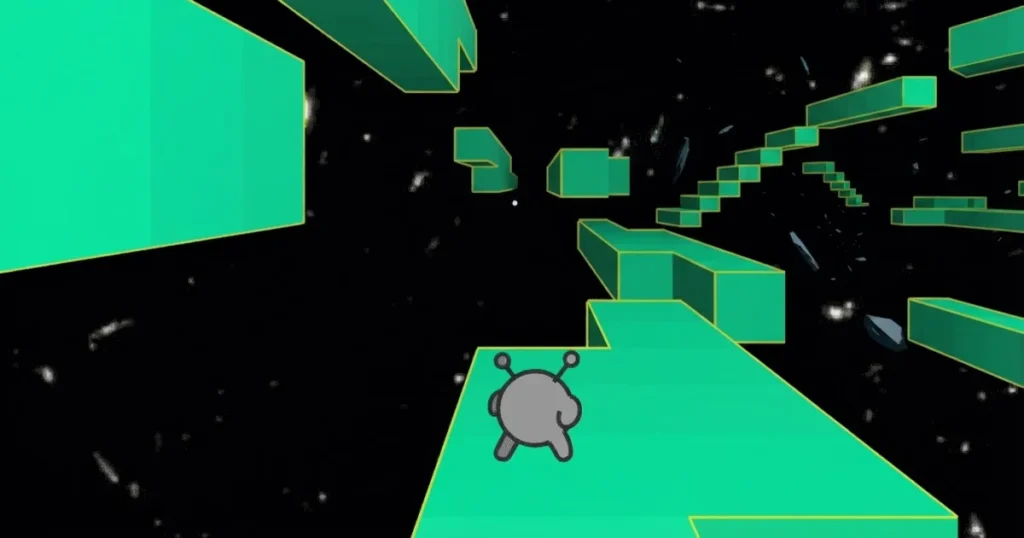







Run 2 drops you into a twisting 3D tunnel suspended in space where gravity is optional and every wall can become your floor. Developed by Imangi Studios, this browser-based runner challenges you to navigate procedurally generated courses by rotating the entire tunnel around you, turning ceilings into pathways and walls into safe ground. Choose between the nimble Runner or the momentum-heavy Skater, each with distinct movement physics that change how you approach every gap and corner. The game runs smoothly in Chrome, Edge, and Firefox, delivering a spatial puzzle wrapped in reflex-driven gameplay.
Table of Contents+
What Is Run 2?
Run 2 is a 3D platformer runner that strips away traditional ground rules. You sprint through a cylindrical tunnel floating in the void, where missing tiles create deadly gaps and the only way forward is to rotate your perspective. The game presents two modes: Explore Mode, which offers a structured series of increasingly complex levels, and Infinite Mode, which generates endless procedural tunnels until you fall. Both modes demand precise timing and spatial awareness as you decide whether to jump over a hole or simply run onto the adjacent wall.
Gravity shifts the moment your feet touch a new surface. Landing on the left wall reorients the camera so that wall becomes your new floor, and the physics adjust instantly. This mechanic turns every level into a three-dimensional maze where the shortest path might loop you upside down twice before reaching the exit. Coins scattered throughout each course unlock new characters and levels, rewarding exploration alongside speed.
How to Play Run 2?
Movement in Run 2 revolves around two core actions: running and jumping. Your character auto-runs forward at a constant pace, so your job is to steer left or right and time your jumps to avoid gaps. The A and D keys (or left and right arrow keys) rotate your position around the tunnel, while the spacebar launches you into the air. Holding the jump button longer increases your arc, giving you control over short hops versus long leaps across multi-tile chasms.
Timing is everything. Jumping too early leaves you short of the next platform, while jumping too late sends you into a hole. The game rewards rhythm: experienced players develop a cadence of taps that syncs with the tile layout, turning each level into a memorized sequence. Missing a jump sends you tumbling into space, forcing a restart from the beginning of that stage or the last checkpoint in Infinite Mode.
Desktop and Keyboard Controls
Desktop players use the arrow keys or WASD for movement and the spacebar to jump. Pressing the left or right arrow (or A and D) rotates your character around the tunnel’s circumference, shifting your position one lane at a time. The spacebar initiates a jump, and holding it extends your airtime, which is critical for clearing wide gaps or chaining multiple jumps across fragmented sections. The game responds instantly to input, so double-tapping or rapid direction changes are viable strategies when navigating tight clusters of holes.
Mobile versions adapt these controls to touch inputs. Virtual buttons on the left side of the screen handle rotation, while a jump button on the right triggers leaps. The touch interface mirrors the keyboard layout, ensuring the same precision once you adjust to the on-screen positioning. Both control schemes work seamlessly across devices, and the game runs without lag in modern browsers.
Mastering Gravity and Movement
The core challenge in Run 2 is understanding that gravity follows your feet, not the camera. When you land on a wall, that wall becomes the floor, and the tunnel rotates to match. This creates situations where you might run along the ceiling to avoid a gap on the traditional floor, then drop back down to the bottom when the path clears. Every surface is valid terrain, and learning to see the tunnel as a 360-degree playing field is the key to progression.
Advanced players use gravity shifts to maintain momentum. Instead of jumping over a long gap, you can rotate onto a side wall where the tiles are intact, sprint across, then rotate back to the main path. This technique is faster than waiting for a safe jump window and becomes mandatory in later levels where the floor is almost entirely missing. The Run 2 wiki documents optimal routes for each stage, showing how top players chain wall transitions to shave seconds off their times.
The Runner vs. The Skater: Character Abilities
The Runner is your starting character, built for precision. Jumps are short and controlled, making it easier to land on specific tiles without overshooting. The Runner’s lower jump height forces you to plan routes carefully, as you can’t clear massive gaps without rotating to find an alternate path. This character excels in levels with tight tile clusters and frequent direction changes, where accuracy matters more than raw distance.
The Skater, unlocked after completing early levels, trades precision for momentum. Jumps are longer and faster, allowing you to clear wider gaps in a single bound. However, the Skater’s increased airtime makes it harder to land on narrow platforms, and the higher speed reduces your reaction window when a hole appears. The Skater dominates Infinite Mode, where long stretches of missing tiles favor aggressive, high-speed play over careful stepping. Choosing between the two characters fundamentally changes your approach to the same level layout.
Shifting Gravity: Navigating 3D Space
Gravity manipulation is not automatic. You must actively rotate your character onto a new surface before gravity shifts. This means you can’t passively fall onto a side wall; you need to press left or right while airborne to align with that wall before landing. Misjudging your rotation mid-jump is a common mistake that sends you into the void instead of onto the intended surface.
The camera follows your orientation, which can be disorienting at first. When you rotate 180 degrees, the tunnel flips, and what was the ceiling is now directly beneath you. The Videogaming Wiki entry recommends practicing in Explore Mode’s early levels to build spatial intuition before tackling Infinite Mode’s randomized chaos. Once you internalize the rotation mechanic, you can chain multiple wall transitions in a single jump, spiraling around the tunnel to dodge complex gap patterns.
Strategies for Endless Progression
Progression in Run 2 is gated by level completion and coin collection. Explore Mode presents a fixed sequence of stages, each introducing new tile arrangements and longer gaps. Completing a level unlocks the next one, and collecting enough coins unlocks additional characters with unique movement stats. Infinite Mode, by contrast, generates procedural tunnels that grow progressively harder the longer you survive, with gaps appearing more frequently and safe paths shrinking.
Coin collection is strategic, not mandatory. Coins often sit on risky tiles or require detours that break your rhythm. Grabbing every coin in a level is slower but unlocks content faster, while ignoring coins and focusing on speed lets you practice difficult sections without distraction. Most players mix both approaches: collect coins on early attempts to unlock characters, then replay levels for pure speed once you’ve memorized the layout.
Essential Tips for High Scores
Memorization beats reaction time in Explore Mode. Each level has a fixed layout, so repeated attempts let you internalize the exact sequence of jumps and rotations. Top players run levels without looking at the tiles, relying entirely on muscle memory to execute frame-perfect inputs. Recording your runs or watching replays helps identify where you lose time, whether it’s hesitating before a jump or taking a suboptimal rotation path.
In Infinite Mode, prioritize survival over coins. The procedural generator places coins in dangerous spots to tempt risky plays, but a single mistake ends your run. Focus on maintaining a consistent rhythm and only grab coins that sit on your natural path. The Skater’s longer jumps make it easier to skip entire sections of missing tiles, but the Runner’s precision is safer when the tunnel narrows and margins shrink.
Use the tunnel’s symmetry to predict gaps. Procedural generation in Infinite Mode follows patterns: if the left side has a cluster of holes, the right side often mirrors it a few tiles later. Rotating early to scout the next section gives you extra reaction time, and experienced players constantly scan ahead while their character auto-runs. This split attention between current footing and future obstacles is the difference between a 500-tile run and a 5,000-tile run.
Unlocking New Paths and Challenges
New characters unlock as you accumulate coins, and each one alters the game’s difficulty curve. The Lizard, for example, has even longer jumps than the Skater but less control in the air, making it a high-risk, high-reward pick for players who’ve mastered rotation timing. The Student offers balanced stats between the Runner and Skater, serving as a middle ground for levels that mix tight corridors with wide gaps.
Explore Mode’s later levels introduce moving tiles, tiles that disappear after you step on them, and sections where the tunnel narrows to a single-file path with no room for error. These mechanics layer on top of the gravity system, forcing you to rotate while tracking temporary platforms. Completing the entire Explore Mode sequence requires hundreds of attempts, and the final levels are considered some of the hardest challenges in browser-based runners.
The Enduring Appeal of Run 2
Run 2 remains popular because it solves a problem most endless runners ignore: spatial variety. Where other games add speed or obstacles, Run 2 adds dimension. The gravity mechanic transforms a simple avoid-the-holes concept into a three-dimensional puzzle where every run feels like navigating an Escher painting. The game’s difficulty scales naturally, starting accessible and ending brutally hard without ever feeling unfair.
The procedural generation in Infinite Mode ensures no two runs are identical, while Explore Mode’s fixed levels support competitive speedrunning. Players share strategies, optimal character picks, and route discoveries, building a community around a game that could have been a disposable time-waster. The fact that it runs instantly in any browser, with no download or account required, keeps the barrier to entry nonexistent. You click, you play, and within seconds you’re rotating through space trying to survive one more tile.
Where to Play Run 2
Run 2 is free to play right now on Arcazi.com, directly in your browser with no download required. Also available on Google Play for Android. Also available on the App Store for iOS.
More Gravity-Defying Runners to Try
If you enjoyed the spatial challenges in Run 2, these games expand on similar mechanics:
- Run 3 – The direct sequel adds new characters, power-ups, and even more complex tunnel layouts with branching paths.
- Slope 2 – A high-speed downhill runner where you tilt through a neon obstacle course with physics-based momentum.
- Temple Run – The classic endless runner that inspired the genre, swapping 3D tunnels for jungle temples and swipe controls.
- Jetpack Joyride – A side-scrolling runner focused on vertical dodging and power-up collection instead of gravity shifts.
Explore the full Runner collection for more reflex-testing challenges.
For Parents
Run 2 is a skill-based platformer with no violent content, dialogue, or mature themes. The gameplay revolves entirely around navigating a geometric tunnel in space, with no characters, story elements, or interactions beyond movement and jumping. The abstract visual style and straightforward mechanics make it appropriate for players of all ages who enjoy spatial puzzles and reflex challenges.
FAQs About Run 2
What are the controls for Run 2?
Use the arrow keys or WASD to rotate your character around the tunnel, and press spacebar to jump. Hold spacebar longer for higher, longer jumps across wide gaps.
How do I unlock new characters in Run 2?
Collect coins scattered throughout levels in Explore Mode. Accumulating enough coins unlocks characters like the Skater, Lizard, and Student, each with unique jump distances and movement speeds.
What is the difference between Explore Mode and Infinite Mode?
Explore Mode features fixed levels with set layouts that you can memorize and speedrun. Infinite Mode generates endless procedural tunnels that get progressively harder until you fall.
How does gravity work in Run 2?
Gravity shifts to match whatever surface your character lands on. Running onto a wall makes that wall the new floor, rotating the camera and physics to match your new orientation.
Which character is best for beginners?
The Runner is ideal for beginners because of its short, controlled jumps that make landing on specific tiles easier. The Skater’s longer jumps are harder to control until you master the rotation timing.
Can I play Run 2 on mobile devices?
Yes, Run 2 supports touch controls on mobile browsers with virtual buttons for rotation and jumping. The game also has dedicated apps on Google Play and the App Store.
How do I survive longer in Infinite Mode?
Focus on maintaining a steady rhythm instead of chasing every coin. Scan ahead while running to spot gaps early, and use wall rotations to find intact paths when the floor is missing.
Does Run 2 save my progress?
Progress saves automatically in your browser’s local storage, including unlocked levels, characters, and collected coins. Clearing your browser data will reset your progress.
Ready to Defy Gravity?
Run 2 is free to play right now on Arcazi.com, running instantly in your browser with no downloads or sign-ups. Jump into the 3D tunnels and start rotating your way through space.