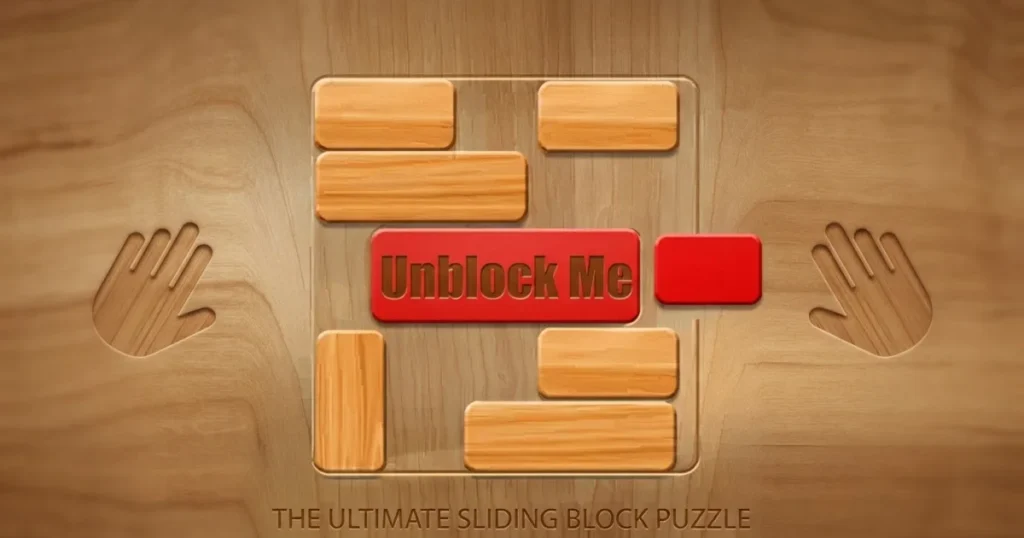



Unblock Me drops you into a 6×6 grid packed with wooden blocks and one simple goal: slide the red block out through the exit. Every puzzle starts with a cluttered board where horizontal blocks move left and right, vertical blocks move up and down, and your job is to clear a path using the fewest moves possible. The game tracks every slide, rewards efficient solutions with stars, and quietly turns into a serious logic workout once you hit the harder levels.
Table of Contents+
What Is Unblock Me?
Unblock Me is a sliding block puzzle game developed by Kiragames that’s been downloaded over 100 million times since its release. The core mechanic never changes—move blocks to free the red one—but the board layouts grow increasingly complex across four difficulty tiers. With over 4,200 hand-crafted puzzles and two distinct play modes, it’s built for both casual solving and competitive optimization.
Sliding Block Mechanics
Every block on the board moves along a single axis. Horizontal pieces slide left or right until they hit another block or the grid edge. Vertical pieces move up or down the same way. The red block always sits horizontally and needs to reach the exit on the right side of the grid. You can’t rotate blocks, lift them over each other, or move them diagonally—the constraints force you to think several moves ahead before touching anything.
Challenge Mode vs. Relaxed Mode
Challenge mode puts a star-rating system front and center. Each puzzle has a par move count set by the developer, and hitting that target earns you three stars. Go a few moves over and you drop to two stars, then one star if you’re well above par. Relaxed mode strips away the pressure entirely—same puzzles, no star ratings, just pure problem-solving at your own pace. Both modes share the same 4,200-puzzle library, so you can switch between them depending on your mood.
Four Difficulty Tiers
The game divides its puzzle collection into Beginner, Easy, Medium, and Expert levels. Beginner grids teach the core logic with sparse layouts and obvious solutions. Expert puzzles pack the board tight, hide the solution path behind multiple layers of blockers, and demand precise move sequences. The difficulty curve is steady—you’re never thrown into deep water without building the skills first.
Move Counter and Par Scores
Every puzzle tracks how many slides it takes you to solve it. The par score isn’t arbitrary—it represents the developer’s intended optimal solution. For example, a Beginner puzzle might have a par of 8 moves, awarding three stars at 8 or fewer, two stars at 9-12, and one star beyond that. This creates a natural replay loop: finish a puzzle to see what’s next, then come back later to chase the three-star solve.
How to Play Unblock Me
The board appears immediately with wooden blocks filling a 6×6 grid and one red block trapped somewhere in the middle. Your only objective is to slide the surrounding blocks out of the way so the red piece can escape through the opening on the right edge. Blocks move along their aligned axis—horizontal pieces go left and right, vertical pieces go up and down. Plan your sequence before making the first move, because every slide counts toward your final score in Challenge mode.
Unblock Me Controls
On desktop, click and drag a block in the direction it can move. Horizontal blocks slide left or right when you drag them horizontally; vertical blocks slide up or down when you drag them vertically. On mobile, tap a block and swipe in the direction you want it to move. The controls respond instantly—there’s no learning curve on the input side, only on reading the board and planning your path.
Browser Compatibility
Unblock Me runs smoothly in Chrome, Edge, and Firefox without requiring any plugins or downloads. The game loads directly in your browser, saves your progress automatically, and works on both desktop and mobile devices through the same web interface.
Tips and Tricks for Unblock Me
Start from the exit: Find the opening where the red block needs to escape, then trace backwards to identify which blocks are directly blocking it first—this reveals the critical path faster than working forward from the red block’s starting position.
Count your moves before sliding: In Challenge mode, every extra slide costs you a star, so mentally plan your full sequence before touching the board—this habit alone will boost your three-star rate significantly.
Clear deeper obstacles first: Some blocks look like they’re blocking the red piece, but they’re actually blocked by another piece behind them—always move the furthest blockers first, then work your way toward the red block.
Use Relaxed mode to experiment: When an Expert puzzle has you stumped, switch to Relaxed mode to test different approaches without worrying about your star rating—once you find the solution, you can replay it in Challenge mode for the optimized solve.
Revisit Beginner puzzles for speed: If you’re chasing better rankings or just want to feel accomplished, replaying early puzzles for fast three-star solves builds your score without the pressure of harder grids.
Where to Play Unblock Me
You can play Unblock Me free right now on Arcazi.com in your browser with no download required. The game loads instantly, saves your progress automatically, and works on both desktop and mobile devices.
Also available on the App Store for iOS.
Also available on Google Play for Android.
Common Questions About Playing Unblock Me
Players searching for Unblock Me solutions often wonder about the game’s scope and structure. The puzzle library is massive, the difficulty scales steadily, and the star-rating system creates natural replay value. Here’s what you need to know about levels, modes, and solving strategies.
How many levels does Unblock Me have?
Unblock Me contains over 4,200 puzzles divided across four difficulty tiers: Beginner, Easy, Medium, and Expert. The game doesn’t use traditional numbered levels—instead, you progress through the puzzle library at your own pace, with each tier unlocking as you complete puzzles in the previous one.
For Parents
Unblock Me is a logic puzzle game with no violent, mature, or inappropriate content. The gameplay involves sliding wooden blocks on a grid to solve spatial reasoning challenges. It’s suitable for all ages and can help develop planning skills and strategic thinking. The game includes optional ads in the free version, but they don’t interrupt active gameplay.
More Puzzle Games to Try
If you’re drawn to the spatial reasoning and strategic planning in Unblock Me, these puzzle games offer similar brain-teasing challenges with their own unique mechanics.
- Jewel Quest – Match three or more gems to clear the board and turn tiles to gold in this classic match-3 adventure.
- Zuma Deluxe – Shoot colored balls to create matches and prevent the chain from reaching the end in this fast-paced marble shooter.
- Candy Crush Saga – Swap candies to create matches and complete objectives across hundreds of sweet puzzle levels.
- Sugar Shock – Match colorful candies in this vibrant puzzle game that rewards quick thinking and combo chains.
- Wheely – Guide a red car through physics-based puzzles by interacting with objects and solving environmental challenges.
- Wheely 2 – The sequel adds new mechanics and trickier puzzles to the car-based problem-solving formula.
- Slither.io – Grow your snake by collecting orbs while avoiding other players in this competitive multiplayer arena.
Each of these games tests your problem-solving skills in different ways, from pattern recognition to physics manipulation, all available in the Puzzle collection.
FAQs About Unblock Me
How do you play Unblock Me?
Click or tap a block and drag it along its axis—horizontal blocks move left and right, vertical blocks move up and down. Slide the other blocks out of the way to create a clear path for the red block to reach the exit on the right side of the grid.
How many puzzles are in Unblock Me?
The game includes over 4,200 puzzles spread across Beginner, Easy, Medium, and Expert difficulty tiers. Each puzzle is hand-crafted with a unique layout and optimal solution path.
Is Unblock Me free to play online?
Yes, you can play the unblock me game free online on Arcazi.com without downloading anything. The browser version loads instantly and saves your progress automatically.
What’s the difference between Challenge and Relaxed mode?
Challenge mode rates your performance with a three-star system based on how efficiently you solve each puzzle compared to the par move count. Relaxed mode removes the star ratings entirely, letting you solve puzzles at your own pace without performance pressure.
Can you download Unblock Me for PC?
The game is designed for browser and mobile play. You can access it instantly through your web browser on PC without needing to download or install anything—just visit Arcazi.com and start playing.
How does the star rating system work?
Each puzzle has a par move count set by the developer. Solve it at or below par to earn three stars, a few moves over par for two stars, and well above par for one star. The par score represents the optimal solution path.
Are there Unblock Me game solutions available?
While solution guides exist online, the game is designed to be solved through logic and planning. If you’re stuck, try switching to Relaxed mode to experiment with different move sequences without worrying about your star rating.
Does Unblock Me have multiplayer?
No, Unblock Me is a single-player puzzle game focused on solo problem-solving. You compete against the par scores set by the developer rather than playing against other people in real time.
Can I play Unblock Me on Android or iPhone?
Yes, the game is available as a mobile app on both the App Store for iOS devices and Google Play for Android. You can also play it directly in your mobile browser on Arcazi.com without installing an app.
What happens when you beat all the levels?
With over 4,200 puzzles in the library, completing every level takes considerable time. Once you finish all puzzles, you can replay them to improve your star ratings or try to beat each puzzle’s par score for a perfect three-star run.
Is there an undo button in Unblock Me?
Yes, the game includes an undo button that reverses your last move. However, it only stores one move in history—hit undo again and it redoes that move rather than going back further.
How do you solve Expert level puzzles?
Expert puzzles require planning multiple moves ahead before touching the board. Start by identifying the exit path, trace backwards to find which blocks directly obstruct it, then determine the sequence needed to clear those blockers—often this means moving pieces that seem unrelated to the red block first.
Start Solving Puzzles Now
Unblock Me is free to play instantly on Arcazi.com with no download required. Load the game in your browser, pick your difficulty tier, and start sliding blocks to free the red piece. Your progress saves automatically as you work through the 4,200-puzzle library.