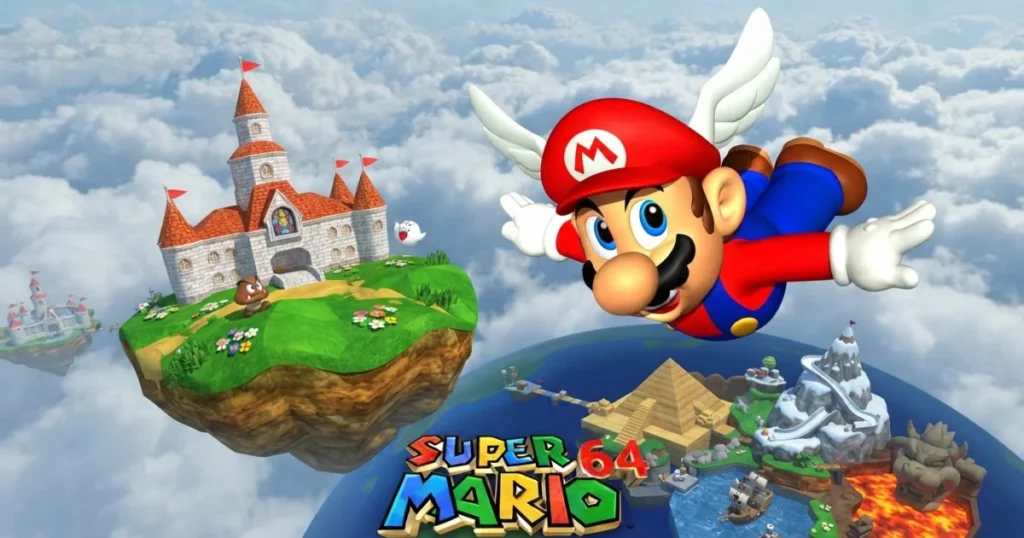








Super Mario 64 revolutionized platforming by bringing Mario into fully explorable 3D worlds. Jump into paintings that transport you to themed courses, collect Power Stars to unlock new areas, and master movement techniques that define precision platforming. The castle hub connects everything, rewarding curiosity and skill in equal measure. 🩷
Table of Contents+
What Is Super Mario 64?
This landmark 3D platformer drops Mario into Princess Peach’s castle, where Bowser has trapped Power Stars inside magical paintings. Each painting leads to a self-contained world with multiple objectives. You’ll need to master analog movement, camera control, and Mario’s expanded moveset to collect enough Stars and reach the final confrontation. The game rewards exploration and experimentation, letting you tackle most challenges in any order you choose.
Core Gameplay Mechanics
Mario’s moveset includes triple jumps, long jumps, wall kicks, and ground pounds. Chaining these moves together creates fluid traversal across platforms, up vertical surfaces, and through the air. Momentum matters—running speed affects jump distance, and landing angles determine your next move. The analog control gives you precise movement in 360 degrees, a fundamental shift from the fixed directions of earlier Mario games.
Power Stars and Course Structure
Each painting world contains six Power Stars tied to specific missions, plus a seventh hidden Star. Missions range from boss battles to races, puzzle-solving to platforming gauntlets. You select a mission before entering, but you can grab any visible Star regardless of your chosen objective. Collecting Stars unlocks doors throughout the castle, gradually opening paths to new paintings and challenges.
Castle Hub Design
Princess Peach’s castle serves as the central hub connecting all courses. Secret Stars hide in the castle itself, rewarding players who experiment with Mario’s moves on staircases, in the moat, and behind locked doors. The layout changes as you progress—new areas become accessible, and previously blocked paths open up. This interconnected design encourages backtracking with new abilities and Star counts.
Movement and Camera Control
The camera system lets you adjust your view with dedicated controls, switching between Lakitu’s following camera and fixed angles. Mastering camera positioning becomes crucial for precise jumps and navigating tight spaces. Some areas lock the camera to specific angles, requiring you to adapt your spatial awareness. Learning when to manually adjust versus trusting the automatic camera separates confident players from frustrated ones.
How to Play Super Mario 64
The game runs directly in your browser with keyboard controls mapped to Mario’s full moveset. You’ll navigate 3D environments, collect Power Stars, and unlock new areas of the castle. Success depends on mastering movement techniques and understanding each course’s layout.
Super Mario 64 Controls
Arrow keys handle Mario’s movement in all directions. The A key makes Mario jump—tap for a short hop, hold for maximum height, or press repeatedly while moving for a triple jump. The S key executes ground pounds when pressed in midair, and crouching when pressed on the ground. The D key punches and grabs objects. Combine directional movement with jump timing to perform long jumps, backflips, and wall kicks. On mobile, an on-screen analog stick controls movement while tap buttons handle jumps, attacks, and camera adjustments.
Browser Compatibility
Super Mario 64 runs smoothly in Chrome, Edge, and Firefox without plugins or downloads. The emulator handles save states automatically, preserving your progress between sessions. For best performance, close unnecessary browser tabs and ensure your browser is updated to the latest version.
Tips and Tricks for Super Mario 64
Master the triple jump early: Three consecutive jumps while running forward launches Mario to incredible heights, reaching platforms that seem impossible with single jumps.
Use the ground pound for hidden secrets: Wooden posts, cracked floors, and suspicious tiles often reveal coins, Stars, or shortcuts when you ground pound them.
Collect 100 coins in each course: Gathering all 100 coins in a world spawns a bonus Power Star, and the extra lives from coins make challenging missions more forgiving.
Adjust the camera before tricky jumps: Position Lakitu behind Mario and center the view before attempting precise platforming—a bad camera angle turns easy jumps into frustrating falls.
Wall kicks extend your reach: Jump toward a wall, then press jump again the moment Mario touches it to launch in the opposite direction—chain multiple wall kicks to climb vertical shafts.
Where to Play Super Mario 64
You can play Super Mario 64 free right now on Arcazi.com. The full game runs in your browser with no download, no installation, and no account required. Just load the page and start collecting Power Stars.
Common Questions About Super Mario 64
Players often wonder about the game’s structure, accessibility, and technical details. Here are answers to the most searched questions about this classic 3D platformer.
Is Super Mario 64 free?
Yes, you can play Super Mario 64 completely free on Arcazi.com with no payment, subscription, or download required.
For Parents
Super Mario 64 offers family-friendly platforming with no violence, mature themes, or concerning content. Mario jumps on enemies that disappear in a puff of smoke, and falling off platforms simply costs a life with no graphic consequences. The game rewards problem-solving, spatial reasoning, and hand-eye coordination. The difficulty curve starts gentle but ramps up significantly in later courses, which may frustrate younger players attempting to collect every Star. Cooperative play isn’t available, but the single-player structure makes it easy for family members to take turns attempting different missions.
More 3D Platformers to Explore
- Basketball Stars
- Jump Only
- Completing the Mission
- Vex Challenges
- Bubble Witch Saga
- Dragon Joust
- Drive Mad 3
These games capture the exploratory spirit and movement mastery that define the Skill category, blending precise control with creative world design.
FAQs About Super Mario 64
How to play Super Mario 64?
Use arrow keys to move Mario, A to jump, S to ground pound or crouch, and D to punch or grab. Combine movements for advanced techniques like triple jumps and wall kicks.
How to play Super Mario 64 online?
Visit Arcazi.com and load the game directly in your browser—no download, account, or plugin required. Your progress saves automatically.
Is Super Mario 64 good?
Yes, it’s widely regarded as one of the most influential 3D platformers ever made, with tight controls, creative level design, and a movement system that still feels responsive today.
What is Super Mario 64?
A 3D platformer where Mario explores Princess Peach’s castle and enters painting worlds to collect Power Stars, using an expanded moveset to navigate fully explorable environments.
How to download Super Mario 64 on PC?
You don’t need to download anything—play the full game instantly in your browser on Arcazi.com without installation or storage space.
Is Super Mario 64 the 64th Mario game?
No, the “64” refers to the Nintendo 64 console it originally appeared on, not the number of Mario games released before it.
How many Power Stars are in Super Mario 64?
There are 120 Power Stars total—70 from the main painting courses, 15 secret Stars in the castle and bonus stages, and 15 from collecting 100 coins in each main course.
Can I save my progress in the browser version?
Yes, the emulator automatically saves your progress, including collected Stars and unlocked doors, so you can continue where you left off in future sessions.