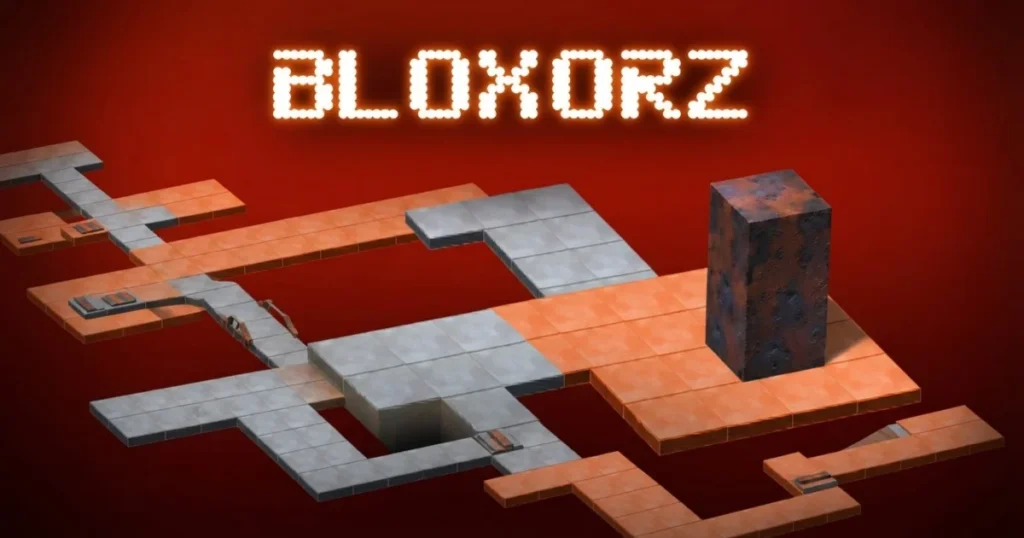




Bloxorz is a grid-based puzzle game that challenges you to flip a rectangular block across a suspended platform and drop it perfectly into a square hole. Every move counts, because one wrong roll sends your block tumbling off the edge. Across 33 levels, the layouts grow increasingly devious, stacking switch mechanics, fragile tiles, and split-block puzzles on top of each other.
Table of Contents+
- What Is Bloxorz?
- How to Play Bloxorz?
- Switch Types and Tile Mechanics
- Split Block Dynamics and Teleportation
- Progression Architecture and Level Passcodes
- Advanced Spatial Strategies and Puzzle Tactics
- Where to Play Bloxorz
- Quick Answers to Common Bloxorz Questions
- More Puzzle Games You Might Enjoy
- For Parents
- FAQs About Bloxorz
- Start Flipping: Play Bloxorz Free Right Now
What Is Bloxorz?
Bloxorz is a logic and skill puzzle game built around a single rectangular block that you must navigate across a floating grid. The objective is straightforward: get the block to fall upright into the square hole at the end of each stage. Falling off the edge or landing the block on its side over the hole restarts the level immediately.
The game spans 33 levels, each one introducing new tile types, switch configurations, and spatial challenges. Early stages teach you the basics of block orientation, while mid-game and late-game levels like level 22, level 28, and the final level demand precise planning and an understanding of every mechanic the game has built up. You can find a detailed breakdown of the game’s history and level structure over at the Bloxorz Flash Gaming Wiki.
How to Play Bloxorz?
The core loop is simple to grasp but hard to master. You move the block by rolling it in one of four directions, and each roll changes the block’s orientation, either standing upright, lying flat along one axis, or flat along the other. Only when the block is standing perfectly upright can it fall into the hole and complete the level. Rolling it over the hole while it’s lying flat does nothing except waste moves.
Desktop and Keyboard Controls
On desktop, you control the block entirely with the arrow keys. Pressing Up, Down, Left, or Right rolls the block one step in that direction. The spacebar serves as an action key, used primarily when you have a split block and need to switch between the two sub-cubes. Mouse input is available for looking around the isometric grid, which helps you read the layout before committing to a move sequence. WASD keys also work as an alternative movement input if you prefer that layout.
The game runs smoothly in Chrome, Edge, and Firefox without any additional setup. Keeping your fingers on the arrow keys and using the mouse only to survey the board is the most efficient desktop approach, especially on later stages where a single misread tile costs you the whole run.
Mobile Touch and Gesture Controls
On mobile, the game uses touch screen controls with swipe gestures to roll the block directionally. Swipe up, down, left, or right to move the block one step in that direction, mirroring the arrow key inputs on desktop. Tapping the screen handles action inputs like switching between sub-cubes during split-block sections.
Bloxorz on mobile rewards deliberate, slow swipes over fast ones. Accidental diagonal swipes are the most common source of errors, so take your time reading the grid before each gesture. The isometric view can make depth perception tricky on smaller screens, so zoom in mentally on the hole position before your final approach.
Switch Types and Tile Mechanics
Switches and special tiles are the backbone of Bloxorz’s puzzle design. Understanding exactly which switch does what, and which tile will hold your block’s weight, is the difference between solving a level cleanly and restarting it a dozen times.
Soft Switches, Heavy Switches, and Bridges
Soft switches, marked with a round symbol, activate whenever any part of the block touches them. That means the block can be standing upright or lying flat and still trigger a soft switch. These typically toggle bridge segments on or off, opening new paths across gaps in the grid. Because they’re easy to trigger, soft switches are often placed in positions where you’ll hit them naturally on the way to the hole.
Heavy switches, marked with an X symbol, only activate when the block is standing perfectly upright on top of them. The full weight of the block must press down on the switch for it to register. These are deliberately placed in awkward spots that require you to plan your approach orientation in advance. Bridges connected to heavy switches often unlock shortcuts or reveal the only viable path to the exit, so identifying them early in a level saves significant backtracking.
Fragile Orange Tiles and Edge Hazards
Orange tiles are the game’s most punishing terrain feature. They crack and break if the block rests on them while lying flat, because the distributed weight across two tiles is too much for the fragile surface. Standing the block upright on a single orange tile is safe, since the load concentrates on one point. Rolling the block flat across an orange section drops it through the floor instantly.
Edge hazards are equally unforgiving. The floating platforms have no walls, and any move that rolls the block off the boundary ends the level. On narrow corridors and L-shaped paths, counting your available tiles before each move prevents accidental falls. The bloxorz orange tile rule and the edge-fall rule together mean that spatial awareness, not just switch logic, determines whether you survive a level.
Split Block Dynamics and Teleportation
Some levels introduce a split switch that divides your single rectangular block into two separate 1×1 cube pieces. This mechanic completely changes how you approach movement and goal completion, and it’s one of the most disorienting shifts in the entire game for new players.
Controlling Sub-Cubes and Recombining
After a split switch activates, you control two independent sub-cubes. Pressing the spacebar toggles control between them, so you move one cube, press spacebar, then move the other. Each sub-cube follows the same rolling rules as the full block, but neither can fall into the hole on its own. You must recombine them into a single rectangular block before attempting the exit.
Recombining happens by maneuvering both sub-cubes so they are adjacent to each other and then rolling one onto the other. The exact positioning matters: they need to be side by side in a line, not diagonal. Some levels use split mechanics to reach switches that are otherwise inaccessible, requiring you to send one sub-cube to a distant switch while parking the other safely on stable ground. Teleportation pads, which appear in certain stages, can warp a sub-cube or the full block to a different section of the grid, adding another layer of routing complexity to the split-block puzzle.
Progression Architecture and Level Passcodes
Bloxorz structures its challenge across a 33-level campaign that escalates steadily from orientation basics to multi-mechanic gauntlets. The game also includes a passcode system so you never lose your place, even if you close the browser.
Navigating the 33 Stages
The 33 levels of Bloxorz form a complete puzzle campaign, with each stage building on the mechanics introduced before it. Early levels like level 2 and level 3 focus on basic rolling and edge awareness. Mid-game levels, including level 10, level 12, and level 15, layer in switch combinations and orange tile sections. Later stages such as level 22, level 28, level 30, level 31, and level 33 combine every mechanic simultaneously, demanding near-perfect route planning from the first move.
The bloxorz final level, level 33, is widely considered the hardest stage in the game. Reaching it requires mastering everything from heavy switch timing to split-block routing. Players tracking a bloxorz walkthrough or attempting a bloxorz speedrun will find that levels 17, 21, 23, and 25 each contain at least one non-obvious switch sequence that blocks progress until the correct approach order is discovered. The Bloxorz MiniClip Wiki documents level layouts and community strategies for the trickiest stages.
Saving Progress with Passcodes
Every level in Bloxorz has a unique passcode that you can enter on the start screen to jump directly to that stage. When you complete a level, the game displays the passcode for the next one. Writing it down immediately is the single most important habit to build, because the game has no automatic cloud save.
All bloxorz level codes follow a six-digit numeric format. The passcode for level 33, the bloxorz last level, is one of the most searched codes in the game’s community. If you’re looking for the code for a specific stage, like the bloxorz level 10 passcode or the bloxorz level 15 passcode, the safest approach is to play through sequentially and record each code as you go. Entering a code like 189493 drops you into a specific mid-game stage, skipping the earlier levels entirely, which is useful for practice runs on a particular puzzle.
Advanced Spatial Strategies and Puzzle Tactics
Once you understand the rules, the real skill in Bloxorz comes from applying them efficiently under pressure. Advanced play is about reading the board before touching a key, not reacting after a mistake.
Managing Block Orientation and Step Calculations
Block orientation is the single most important variable in every Bloxorz puzzle. Before moving, identify whether you need the block to arrive at the hole standing upright, and then work backwards from that endpoint to figure out which sequence of rolls produces the correct final orientation. Rolling in a straight line an even number of steps returns the block to its starting orientation. An odd number of steps flips it. Using this parity rule lets you plan approach angles without trial and error.
Step calculation becomes critical on levels with limited tile space, like level 6, level 7, level 9, level 11, and level 13. On these stages, the path to the hole is narrow enough that a single wasted move can leave you stranded with no room to correct orientation. Count the available tiles in each direction before committing to a route. On levels with multiple switches, prioritize activating heavy switches first, since they require upright positioning and are harder to work into a route after the fact. Soft switches can usually be triggered on the way out rather than the way in, saving steps.
For the toughest mid-to-late stages, treat each level as two separate problems: first, figure out how to activate all required switches in the correct order; second, figure out how to arrive at the hole upright after doing so. Solving these two sub-problems independently and then merging the solutions is the core of advanced bloxorz puzzle strategy. Players going for a bloxorz speedrun should also note that some levels have shorter alternate routes that only become visible once you stop fixating on the most obvious path across the grid.
Where to Play Bloxorz
Bloxorz is free to play right now on Arcazi.com, directly in your browser with no download required.
Also available on the App Store for iOS.
Also available on Google Play for Android.
Quick Answers to Common Bloxorz Questions
These are the questions players search most often when they hit a wall in the game. Here are direct answers based on the game’s actual mechanics.
How many levels are there in Bloxorz?
Bloxorz has exactly 33 levels. There is no level 100 in the original game, and any code claiming to unlock one does not correspond to an official stage in the 33-level campaign.
How to beat level 10 on Bloxorz?
Level 10 requires careful switch sequencing. Identify the heavy X switch on the board and plan your approach so the block arrives upright on it before heading to the hole. Avoid rolling flat across any orange tiles in the section near the switch.
How to beat level 13 on Bloxorz?
Level 13 involves a tight grid with a switch that opens a bridge to the exit. Trigger the soft round switch first by rolling over it in any orientation, then navigate the newly opened path and arrive at the hole standing upright.
More Puzzle Games You Might Enjoy
- Bucket Smash – A satisfying physics-based puzzle game where you smash stacked buckets with well-aimed shots.
- Yukon Solitaire – A challenging solitaire variant that demands careful card sequencing and forward planning.
- Riddle School 2 – A clever point-and-click puzzle adventure where you solve creative escape scenarios.
- Clashdle – A daily word-style guessing game built around Clash of Clans characters and knowledge.
- Among Us – The social deduction classic where you identify the impostor before the crew is eliminated.
- Math Bros – A fast-paced number puzzle game that sharpens arithmetic skills through increasingly tricky challenges.
All of these titles sit comfortably in the Puzzle category alongside Bloxorz, so if you enjoy logic and brain-teaser gameplay, there’s plenty more to explore.
For Parents
Bloxorz is a single-player logic and strategy puzzle game focused entirely on spatial reasoning and grid navigation. The gameplay involves moving a rectangular block across floating platforms to reach a target hole, with no combat, characters, or story content of any kind. The challenge is purely mental, making it a brain-teaser style experience built around geometry, planning, and problem-solving.
FAQs About Bloxorz
How to play Bloxorz?
Use the arrow keys to roll your rectangular block across the grid and drop it upright into the square hole at the end of each level. Falling off the edge or landing flat over the hole restarts the stage.
How to play Bloxorz level 7?
Level 7 introduces a switch that must be triggered before the exit path opens. Roll over the soft round switch first, then navigate the newly accessible tiles and position the block upright over the hole to complete the stage.
How to do Bloxorz level 11?
Level 11 requires activating a heavy X switch by standing the block upright on it. Plan your rolling sequence so the block arrives at the switch in an upright position, then proceed to the hole along the bridge it unlocks.
How to do Bloxorz level 3?
Level 3 is an early orientation exercise. Keep the block away from the edges, roll it toward the switch to open the bridge, and approach the hole from the correct angle so the block is standing upright when it drops in.
How to do Bloxorz level 9?
Level 9 features a narrow path that limits your maneuvering room. Count your available tiles carefully, trigger the switch in the correct order, and use the parity rule to ensure the block arrives at the hole upright rather than flat.
How to do Bloxorz level 12?
Level 12 combines orange fragile tiles with a switch sequence. Stay upright when crossing the orange section, activate the required switch, and then route back to the hole without retracing over the fragile tiles unnecessarily.
How to do Bloxorz level 6?
Level 6 has a constrained grid where rolling in the wrong direction quickly runs out of space. Identify the soft switch location first, roll over it to open the bridge, and then approach the exit hole with the block standing upright.
How to do Bloxorz level 13?
Trigger the soft round switch to open the bridge leading to the exit, then navigate that path and drop the block into the hole while it’s standing upright. Avoid unnecessary moves that flip the block’s orientation before the final approach.
How to pass level 33 in Bloxorz?
Level 33 is the bloxorz final level and requires executing a precise multi-switch sequence before the exit becomes accessible. Work through each switch in order, manage your block orientation at every step, and arrive at the hole upright to finish the game.
How to beat Bloxorz level 6?
Roll over the soft switch to toggle the bridge open, then navigate the path to the hole without falling off the narrow edges. Keep the block’s orientation in mind throughout so it lands upright in the square hole at the end.
How to pass level 17 on Bloxorz?
Level 17 contains a non-obvious switch activation order. Trigger the switches from the outer edge of the grid inward, keeping the block upright for any heavy X switches, and use the opened bridges to reach the exit hole.
How many Bloxorz levels are there?
There are 33 levels in Bloxorz. Each one has a unique passcode so you can return to any stage without replaying from the beginning.
Start Flipping: Play Bloxorz Free Right Now
Bloxorz is free and loads instantly in your browser on Arcazi.com, no download or account needed. Jump straight into level 1 or enter a passcode to pick up exactly where you left off.