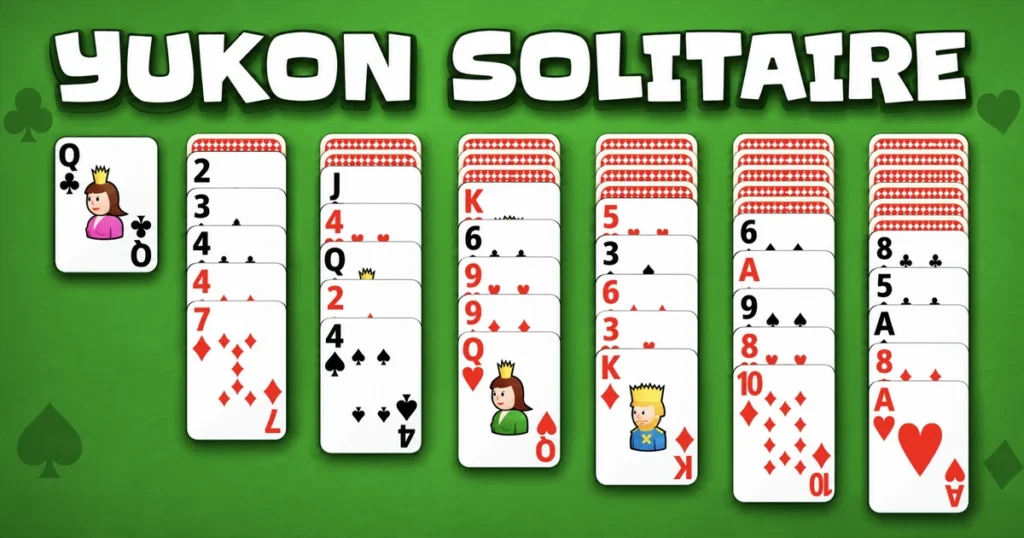














Yukon Solitaire takes the familiar foundation-building structure of classic patience games and adds a unique twist that changes how you approach every move. All cards are dealt face-up at the start, giving you complete visibility of the tableau from the first moment. Your goal is to build four foundation piles in ascending order from Ace to King, one for each suit, while managing a seven-column tableau that allows group transfers even when cards are out of sequence. This single rule creates a strategic depth that sets it apart from other solitaire variations.
Table of Contents+
- What Is Yukon Solitaire?
- How to Play Yukon Solitaire?
- Tableau Layout Structure and Foundation Objectives
- Card Movement Rules and Group Transfer Mechanics
- Master Strategies for Unlocking Hard-to-Reach Cards
- Where to Play Yukon Solitaire
- More Card Games You Might Enjoy
- For Parents
- FAQs About Yukon Solitaire
- Start Playing Yukon Solitaire Now
What Is Yukon Solitaire?
Yukon Solitaire is a card game that combines the foundation-building objective of traditional solitaire with a flexible card-movement system. Unlike variations that require strict sequencing for every transfer, this version lets you move entire groups of cards together as long as the starting and target cards follow the alternating-color rule. The tableau consists of seven columns with a mix of face-up and face-down cards, and your task is to uncover hidden cards while organizing the visible ones into descending sequences. Players on Reddit’s solitaire community often highlight how this mechanic creates puzzles that feel more forgiving at first but demand careful planning to avoid soft-locks.
The game requires no stock pile or waste pile, which means every card you need is already on the board. Empty columns can only be filled with Kings, making column management a critical part of your strategy. Each decision about which group to move and where to place it ripples through the rest of the tableau, and one poorly timed transfer can block access to cards you need later. Success depends on recognizing which face-down cards to prioritize uncovering and which sequences to build first.
How to Play Yukon Solitaire?
Playing Yukon Solitaire starts with understanding the initial layout and the two main actions you perform: moving individual cards or groups to build descending tableau sequences, and transferring Aces and their suit followers to the foundation piles. The tableau columns contain a mix of face-down and face-up cards, and your primary objective is to reveal all face-down cards while organizing the face-up ones into valid sequences. Once an Ace appears, you can move it to a foundation pile and begin building that suit upward. The game runs smoothly in Chrome, Edge, and Firefox, with no installation required.
Every move you make must respect the alternating-color rule: red cards can only be placed on black cards, and black cards can only be placed on red cards. The unique mechanic here is that you can select any face-up card in a column and move it along with all the cards on top of it, even if those cards are not in sequence. The only requirement is that the card you are moving and the card you are placing it on must form a valid descending pair with alternating colors. This flexibility allows you to reposition large groups quickly, but it also means you need to think several moves ahead to avoid trapping key cards under misaligned sequences.
Mouse and Cursor Drag Controls
On desktop, you control the game entirely with your mouse. Click on any face-up card in the tableau to select it, then drag it to a valid target location. The game highlights compatible drop zones as you drag, showing you where the card and its attached group can legally land. Releasing the mouse button completes the move. To send a card to a foundation pile, click and drag it to the appropriate foundation slot at the top of the screen. Right-clicking is not used in this game, so all interactions happen through left-click drag-and-drop.
Double-clicking a card will attempt to auto-move it to a foundation pile if the move is valid, which speeds up endgame cleanup when you have multiple cards ready to ascend. If you make a mistake, most implementations include an undo button that lets you reverse your last action. Hovering over a card does not reveal any hidden information, so you must rely on the visible card faces and the positions of face-down cards to plan your strategy.
Mobile Touch Controls and Interface Navigation
On mobile devices, tap any face-up card to select it, then tap the destination card or column where you want to place it. The game automatically moves the selected card along with all cards stacked above it, provided the move follows the alternating-color rule. Tapping a foundation pile when you have a valid card selected will transfer that card to the foundation. The interface adapts to smaller screens by enlarging tap targets and adjusting card spacing, so you can play comfortably on phones and tablets.
Double-tapping a card triggers the same auto-move behavior as double-clicking on desktop, sending the card to a foundation pile if possible. Pinch-to-zoom is not typically supported because the layout is designed to fit the screen without scrolling. If you need to undo a move, look for the undo icon in the corner of the screen, usually represented by a curved arrow. Touch controls respond instantly, making it easy to execute rapid sequences of moves once you have identified the correct path.
Tableau Layout Structure and Foundation Objectives
The tableau in Yukon Solitaire consists of seven columns, each containing a different number of cards. The first column has one card, the second has two, and so on, up to the seventh column with seven cards. Not all cards are face-up at the start: each column has a specific number of face-down cards that you must uncover by moving the face-up cards above them. The foundation area contains four empty slots, one for each suit, where you build ascending sequences from Ace to King.
Understanding the initial distribution of face-down cards is key to planning your opening moves. Columns with more face-down cards often hide critical cards like Aces or Kings, so prioritizing those columns can unlock more options. The foundation piles do not interact with the tableau once a card is placed there, meaning you cannot move cards back down from the foundations. This one-way transfer makes it important to confirm that moving a card to a foundation will not block a necessary tableau sequence.
Initial Card Deal and Hidden Card Piles
At the start of each game, the seven columns are dealt with a specific pattern of face-down and face-up cards. The leftmost column typically has the fewest face-down cards, while the rightmost column has the most. Each face-down card represents a potential obstacle or opportunity, depending on what lies beneath it. Uncovering a face-down card happens automatically when you move all the face-up cards that were covering it, flipping the top face-down card in that column to face-up.
The distribution of face-down cards creates natural bottlenecks in the puzzle. If a column has multiple face-down cards stacked together, you may need to perform several transfers to other columns before you can reveal what is hidden. Some games place Aces or other critical cards under these face-down stacks, forcing you to work through intermediate sequences before you can start building foundations. Recognizing which columns are most likely to contain high-value cards helps you prioritize your moves.
Building Suit Foundations from Ace to King
Foundation piles are built in ascending order, starting with an Ace and ending with a King, and each pile must contain only one suit. Once you move an Ace to a foundation, you can place the Two of the same suit on top of it, then the Three, and so on. The foundation area is separate from the tableau, and cards placed there cannot be moved back down. This permanence means you should avoid moving a card to a foundation if doing so will block a necessary tableau sequence.
Building foundations is the ultimate goal, but it is not always the best immediate move. Sometimes leaving a low card in the tableau gives you more flexibility to rearrange other sequences. For example, if you have a Two of Hearts in the tableau and you need to move a group of cards onto a Three of Spades, you might delay moving the Two to the foundation until after you have completed that transfer. Balancing foundation-building with tableau management is the core strategic tension in Yukon Solitaire.
Card Movement Rules and Group Transfer Mechanics
The defining feature of Yukon Solitaire is its group-transfer mechanic, which allows you to move multiple cards at once without requiring them to be in sequence. When you select a card, all cards on top of it in the same column are moved together as a single unit. The only restriction is that the card you are moving and the card you are placing it on must form a valid descending pair with alternating colors. This rule applies only to the two cards that make contact, not to the entire group being moved.
This mechanic creates situations where you can reposition large stacks of cards in a single move, but it also introduces complexity. If you move a group of cards that includes a King onto a Queen, you might inadvertently bury a card you need later under a sequence that is difficult to dismantle. The flexibility of group transfers is both a tool and a trap, and learning to recognize which moves open up the board versus which moves create dead ends is the key to consistent success.
Unfiltered Group Relocation Tactics
Because you can move groups of cards even when they are not in sequence, you have the ability to relocate entire sections of the tableau in ways that would be impossible in other solitaire variations. For example, if you have a column with a Seven of Diamonds on top of a Four of Clubs on top of a Jack of Hearts, you can move all three cards together by placing the Seven on an Eight of Spades elsewhere on the board. The Four and Jack come along for the ride, even though they do not form a valid sequence with the Seven.
This tactic is most useful when you need to uncover a face-down card in a column that is blocked by a large stack of face-up cards. By moving the entire stack to another column, you can flip the face-down card and potentially reveal an Ace or another card that unlocks new moves. The risk is that the stack you just moved might now be in a position where it blocks other sequences, so you need to evaluate whether the uncovered card is worth the trade-off. Experienced players often move groups back and forth between columns multiple times to access different face-down cards in sequence.
Empty Column Management and King Placement
Empty columns are a limited resource in Yukon Solitaire, and they can only be filled by placing a King in them. Once a column is empty, it acts as a temporary holding area for any King and the cards stacked on top of it. This rule makes empty columns extremely valuable for reorganizing the tableau, because you can use them to isolate a King and its attached cards while you work on other sequences. However, filling an empty column with the wrong King can lock you out of critical moves later.
The best practice is to avoid creating an empty column unless you have a specific plan for which King to place there. If you clear a column by moving all its cards elsewhere, resist the temptation to immediately fill it with the first King you see. Instead, survey the entire tableau to identify which King is blocking the most important cards or which King would benefit most from being relocated. Sometimes the optimal move is to leave the column empty for several turns until the right King becomes available. Empty columns also serve as escape hatches when you need to break apart a problematic sequence, so preserving that option can be more valuable than filling the column prematurely.
Master Strategies for Unlocking Hard-to-Reach Cards
Winning Yukon Solitaire requires more than just following the basic rules; you need to develop a systematic approach to uncovering face-down cards and avoiding positions where no legal moves remain. The most common cause of failure is creating a tableau configuration where all the cards you need are buried under sequences that cannot be dismantled without violating the alternating-color rule. Preventing this outcome means thinking several moves ahead and prioritizing moves that increase your future options rather than moves that simply look convenient in the moment.
Advanced players focus on maintaining flexibility by keeping multiple columns active and avoiding situations where a single column becomes overloaded with cards. If one column grows too tall, it becomes difficult to move cards out of it because you need a long descending sequence elsewhere to accept the transfer. Balancing the height of columns and spreading cards across the tableau evenly gives you more opportunities to rearrange sequences when you hit a bottleneck.
Exposing Face-Down Tableau Cards
Every face-down card represents unknown information, and uncovering them is the primary way to generate new moves. The fastest way to expose face-down cards is to move all the face-up cards covering them to other columns. This often requires chaining multiple transfers together: you might need to move a group of cards from Column A to Column B, which frees up space to move another group from Column C to Column A, which finally uncovers the face-down card in Column C.
Prioritize uncovering face-down cards in columns that have the fewest face-up cards on top of them, because these are the easiest to clear. Once you reveal a face-down card, immediately evaluate whether it opens up new sequences or provides a card you need for a foundation. If the newly revealed card is a King, consider whether you should move it to an empty column right away or leave it in place while you work on other parts of the tableau. The order in which you uncover face-down cards can determine whether you win or lose, so treat each uncovering decision as a strategic choice rather than a routine action.
Multi-Step Sequence Planning and Deadlock Avoidance
Deadlocks occur when you reach a tableau state where no legal moves exist, and all the cards you need to progress are trapped under sequences that cannot be moved. The most common deadlock pattern involves two or more columns where each column contains a card that needs to be moved to another column, but none of the moves can be executed because the target cards are also blocked. Avoiding deadlocks requires planning at least three to five moves ahead and checking whether each move preserves at least one viable path forward.
One effective technique is to identify critical cards early, such as Aces or low-numbered cards that you will need to build foundations, and then work backward to determine which sequences must be dismantled to access those cards. If you notice that a critical card is buried under a long sequence, start planning the series of transfers that will eventually free it. Sometimes this means making moves that do not immediately improve your position but set up future moves that will.
For example, you might move a group of cards to a less convenient column now because doing so will create an empty column later that you can use to relocate a King. Multi-step planning is the difference between players who win occasionally and players who win consistently.
Where to Play Yukon Solitaire
You can play Yukon Solitaire free right now on Arcazi.com in your browser with no download required. Also available on the App Store for iOS. Also available on Google Play for Android.
More Card Games You Might Enjoy
- Time Shooter 3 – A tactical shooter where time moves only when you move, letting you plan every shot and dodge in slow motion.
- Narrow One – Team-based archery combat where you defend your flag and eliminate opponents with precise bow shots.
- Geometry Dash Meltdown – Rhythm-based platformer with fast-paced obstacle courses synced to electronic music tracks.
- Wordscapes – Word puzzle game that combines anagrams with crossword-style grids in scenic backgrounds.
- Rooftop Snipers 2 – Physics-based dueling game where you knock opponents off rooftops with oversized weapons.
- Wheely 6 Fairytale – Puzzle adventure starring a red car navigating fairytale-themed levels with interactive objects.
These games offer different takes on strategy and quick thinking, and you can find even more options in the Card section.
For Parents
Yukon Solitaire is a single-player card game with no violent content, chat features, or in-game purchases when played on Arcazi.com. The gameplay focuses entirely on logic and pattern recognition, making it suitable for players of all ages who enjoy strategic puzzles. All interactions involve moving cards on a static board, and there are no time limits or competitive elements that might create frustration. Parents can feel comfortable allowing children to play this game as a way to practice planning and problem-solving skills in a calm, focused environment.
FAQs About Yukon Solitaire
How to play yukon solitaire?
Move cards in the tableau by placing them in descending order with alternating colors, and build foundation piles from Ace to King for each suit. You can move groups of cards together even if they are not in sequence, as long as the starting and target cards form a valid pair.
How to play quadruple yukon solitaire?
Quadruple Yukon Solitaire uses four decks instead of one, creating a much larger tableau with more columns and foundation piles. The core rules remain the same, but the increased number of cards makes the game significantly longer and more complex.
How to win yukon solitaire?
Focus on uncovering face-down cards early, keep empty columns available for Kings, and avoid creating sequences that trap critical cards. Plan several moves ahead to ensure you always have at least one legal move available.
How to play klondike solitaire with cards?
Klondike Solitaire uses a stock pile and waste pile, and you can only move single cards or properly sequenced groups. Yukon Solitaire eliminates the stock pile and allows unfiltered group transfers, making it a distinct variation.
How to play solitaire game?
Most solitaire games involve building foundation piles in ascending order by suit while organizing a tableau in descending order with alternating colors. Specific rules vary by variation, but the goal is always to move all cards to the foundations.
Can I undo moves in Yukon Solitaire?
Most implementations include an undo button that lets you reverse your last move, which is useful for testing different strategies. However, relying too heavily on undo can prevent you from learning to plan moves in advance.
What happens when I run out of moves?
If no legal moves remain and you have not completed all four foundations, the game ends in a loss. This is called a deadlock, and avoiding it requires careful planning to ensure you always have at least one valid transfer available.
Can I move cards from the foundation back to the tableau?
No, cards placed in foundation piles cannot be moved back to the tableau. Once a card is in a foundation, it stays there for the rest of the game, so make sure moving it will not block necessary tableau sequences.
How many cards are dealt face-down at the start?
The number of face-down cards varies by column, with the leftmost columns typically having fewer face-down cards than the rightmost columns. The exact distribution depends on the specific implementation, but all face-down cards must be uncovered to win.
Is there a time limit in Yukon Solitaire?
No, Yukon Solitaire has no time limit, allowing you to take as long as you need to plan each move. This makes it a relaxing game focused on strategy rather than speed.
Can I play Yukon Solitaire offline?
The browser version on Arcazi.com requires an internet connection, but the mobile apps available on the App Store and Google Play offer offline play once downloaded.
What is the difference between Yukon and Klondike Solitaire?
Yukon Solitaire has no stock pile or waste pile, and you can move groups of cards even when they are not in sequence. Klondike requires you to draw from a stock pile and only allows moving properly sequenced groups, making Yukon more flexible but also more complex.
Start Playing Yukon Solitaire Now
Yukon Solitaire is free to play instantly in your browser on Arcazi.com with no download or registration required. Jump into a game right now and test your strategic planning skills against one of the most flexible solitaire variations available.