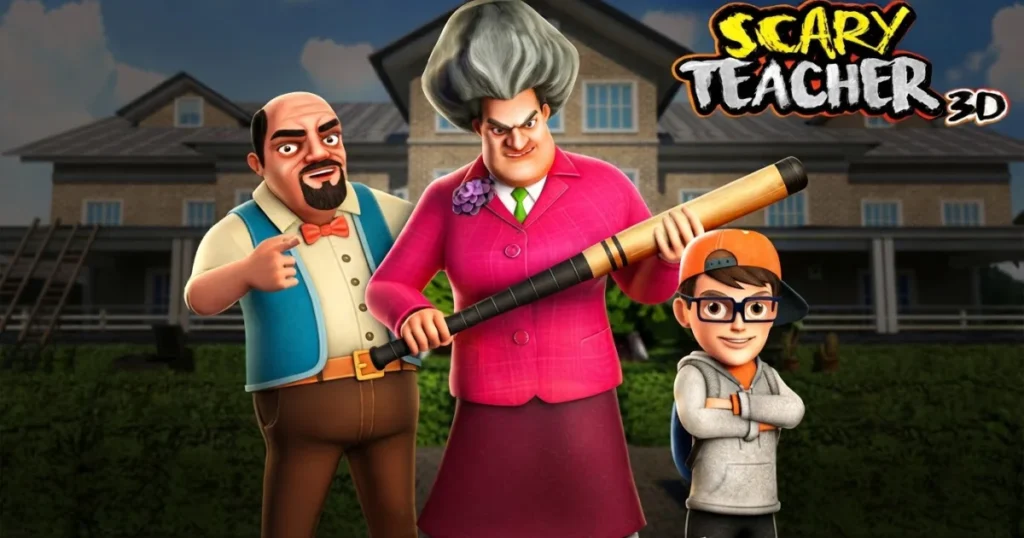






Scary Teacher 3D drops you into the shoes of Nick, a prankster student determined to outwit Misty, the neighborhood’s most notorious cranky teacher. Each level challenges you to sneak through her house, plant hilarious traps, and escape before she catches you. Cartoon visuals and comical chaos make every prank feel like a victory, while stealth mechanics keep the tension high.
Table of Contents+
- Movement Controls & Input Mechanics for Scary Teacher 3D
- Stage Progression & Level Acts Architecture
- Hazards, Traps & Physics Mechanics
- Platforms
- What is Scary Teacher from Prankster 3D game based on?
- Where can I play Scary Teacher 3D?
- Essential Tips to Beat Difficult Stages
- Where to Play Scary Teacher 3D
- More Stealth and Escape Adventures
- For Parents
- FAQs About Scary Teacher 3D
- Start Pranking Misty Now
Movement Controls & Input Mechanics for Scary Teacher 3D
Navigating Nick through Misty’s house requires precise input handling across both desktop and mobile platforms. The game adapts its control scheme based on your device, ensuring smooth gameplay whether you’re using a keyboard or touchscreen. Understanding these mechanics is critical for timing your pranks and avoiding detection.
Keyboard & Desktop WASD Controls
Desktop players rely on WASD keys or Arrow keys to move Nick in all directions. Hold Shift to run when you need a speed boost to escape Misty’s line of sight. The Mouse controls your camera angle and lets you look around corners before committing to a move. Clicking interacts with objects like doors, drawers, and prank items scattered throughout each room. This setup works flawlessly in Chrome, Edge, and Firefox without any plugins.
Touch Screen & Mobile Navigation
Mobile players use a Virtual Joystick on the left side of the screen to guide Nick’s movement. Drag and release gestures handle aiming and launching pranks like water balloons or buzzing bees. Tap icons on the right to interact with objects or sprint away from danger. The touch controls respond instantly, making it easy to hide behind furniture or dart into closets when Misty starts patrolling nearby.
Stage Progression & Level Acts Architecture
Scary Teacher 3D structures its campaign into distinct acts, each containing multiple rooms and objectives. Early levels introduce basic stealth concepts like hiding behind couches and timing your movements around Misty’s patrol routes. Later acts layer in complex multi-step pranks that require you to gather items from different rooms, combine them, and execute the setup without triggering alarms. Every completed act unlocks the next, gradually expanding the house layout and raising the difficulty.
Some missions focus on single-target pranks like releasing a cat into Misty’s bedroom, while others demand you sabotage multiple objects in sequence. The Scary Teacher Wiki tracks every level’s objectives and item locations, helping players who get stuck on trickier stages. Progression feels rewarding because each new act introduces fresh rooms with unique hazards and prank opportunities.
Reaching Checkpoints & Hard Mode Unlocks
Checkpoints appear after you finish key objectives within a level, letting you restart from that point if Misty catches you. This system prevents frustration on longer missions where a single mistake near the end would otherwise force a full replay. Once you clear the standard campaign, Hard Mode unlocks with tighter patrol patterns and shorter reaction windows. Misty moves faster, hears footsteps from greater distances, and checks hiding spots more frequently, demanding near-perfect execution of every prank.
Hazards, Traps & Physics Mechanics
Misty’s house is packed with environmental hazards that can either help or hinder your pranks. Creaky floorboards alert her to your presence if you step on them while running, forcing you to walk slowly through certain hallways. Locked doors require keys hidden in drawers or under furniture, adding a scavenger hunt layer to stealth gameplay. Physics-based traps like rolling marbles or tipping bookshelves create chain reactions that distract Misty, giving you a window to slip past her.
Interactive objects respond realistically to your actions. Dropping a lawnmower down the stairs creates noise that pulls Misty away from your target area. Filling her coffee mug with hot sauce triggers a cutscene where she reacts in exaggerated cartoon fashion, buying you time to complete secondary objectives. The ZNK games Wiki documents every trap’s trigger radius and effect duration, which is useful for planning advanced prank combos.
Platforms
Scary Teacher 3D runs on both web browsers and mobile devices, making it accessible wherever you play. The browser version supports desktop and laptop computers, while the mobile build adapts the interface for phones and tablets. Both versions share the same level content and progression, so you can switch between devices without losing your place in the campaign.
What is Scary Teacher from Prankster 3D game based on?
Scary Teacher 3D shares DNA with ZnK Games’ earlier title Prankster 3D, which also focused on stealth-based pranking gameplay. Both games feature similar cartoon art styles and mission structures where players set traps and avoid detection. Scary Teacher 3D expands the formula by adding a persistent antagonist in Misty and a larger, more interconnected house layout. The core loop of sneaking, interacting, and escaping remains consistent across both titles.
Where can I play Scary Teacher 3D?
You can play Scary Teacher 3D for free on Arcazi. Scary Teacher 3D is available on your computer as well as mobile devices like phones and tablets.
Essential Tips to Beat Difficult Stages
Master the crouch-walk technique by tapping Shift lightly instead of holding it, letting you move quietly across creaky floors without triggering Misty’s hearing radius. Always scout patrol routes before committing to a prank by peeking around corners with the Mouse. If you’re stuck on the stinky sauna level, grab the towel from the bathroom first, then place it near the sauna door to block Misty’s exit path after you activate the steam.
Use environmental noise to your advantage. Knocking over a vase in one room pulls Misty away from your actual target, giving you a clear path to plant your prank. Save your sprint for emergencies because running generates noise that alerts her instantly. On mobile, adjust the Virtual Joystick sensitivity in the pause menu to improve precision when navigating tight spaces like closets or under tables.
Replay earlier levels to practice timing and memorize item locations. Many players struggle with chapter 1 because they rush instead of observing Misty’s full patrol loop. Wait for her to turn her back completely before moving, and always have an escape route planned. Hard Mode demands you chain multiple pranks without getting caught once, so perfecting the basics on normal difficulty saves frustration later.
Where to Play Scary Teacher 3D
Play Scary Teacher 3D free right now on Arcazi.com in your browser with no download required. Also available on Google Play for Android. Also available on the App Store for iOS.
More Stealth and Escape Adventures
If you enjoyed pranking Misty, these games deliver similar thrills:
- Escape Road Winter – Outrun police through snowy streets in this high-speed chase game where every turn counts.
- Poppy Playtime – Survive a haunted toy factory by solving puzzles and avoiding monstrous mascots in this horror adventure.
- Fleeing the Complex – Choose your escape route through a maximum-security prison in this choice-driven stealth game.
- Riddle School 3 – Break out of school detention by collecting items and outsmarting teachers in this classic point-and-click escape.
- Stealing the Diamond – Plan the perfect heist with branching paths and comedic fail states in this interactive adventure.
- Times Table Duck – Sharpen your math skills while racing through levels in this educational arcade game.
Explore more heart-pounding challenges in our Escape collection.
For Parents
Scary Teacher 3D features cartoon-style stealth gameplay where children prank an exaggerated, comically mean teacher character. The game contains no graphic violence, but it does involve sneaking, hiding, and setting up harmless traps like releasing bees or spilling food. The humor is slapstick and the consequences are lighthearted, with Misty reacting in over-the-top animated ways when pranks succeed. Parents should note the game rewards mischief and rule-breaking within its fictional context, which may not align with all family values.
FAQs About Scary Teacher 3D
How to play scary teacher 3d?
Use WASD or Arrow keys to move Nick through Misty’s house, hold Shift to run, and click to interact with objects. Sneak around, set traps, and escape before she catches you.
How to play scary teacher 3d chapter 1?
Chapter 1 teaches basic stealth by having you release a cat from a cage. Find the key in the living room drawer, unlock the cage in the bedroom, and exit through the front door while avoiding Misty’s patrol.
What is scary teacher 3d?
Scary Teacher 3D is a stealth adventure game where you play as Nick, a student pranking his cranky neighbor Misty by sneaking through her house and setting up traps.
How to beat scary teacher 3d stinky sauna?
Grab the towel from the bathroom, place it near the sauna door, then activate the steam controls. The towel blocks Misty’s exit, letting you complete the prank and escape through the back hallway.
How old is scary teacher 3d?
Scary Teacher 3D was released in 2024 by ZnK Games and continues to receive updates, with the most recent refresh in 2025.
How to install scary teacher 3d?
No installation is needed for the browser version. Visit Arcazi.com and click play to start instantly. For mobile, download from the App Store or Google Play.
How to download scary teacher 3d in pc?
The PC version runs directly in your browser without downloading. Open Chrome, Edge, or Firefox, navigate to Arcazi.com, and launch the game immediately.
How to play scary teacher 3d on pc?
Load the game on Arcazi.com using any modern browser. Use WASD to move, Mouse to look around, and Shift to sprint. All controls work instantly without setup.
Can I save my progress in Scary Teacher 3D?
Progress saves automatically after completing each level. Your browser stores checkpoint data locally, so you can close the game and resume from the last completed act when you return.
What are the best hiding spots in Scary Teacher 3D?
Closets and under beds provide full concealment, but Misty checks them if she hears noise nearby. Crouching behind large furniture like couches works better for quick escapes during active chases.
Is Scary Teacher 3D multiplayer?
No, Scary Teacher 3D is a single-player experience. You control Nick alone as he pranks Misty through a series of solo stealth missions.
How do I unlock all levels in Scary Teacher 3D?
Complete each act in sequence to unlock the next. There are no shortcuts, but finishing optional bonus objectives within levels can reveal secret stages and cosmetic rewards.
Start Pranking Misty Now
Scary Teacher 3D is free to play instantly on Arcazi.com with no download or account required. Jump into the first level and see if you can outsmart the neighborhood’s crankiest teacher.