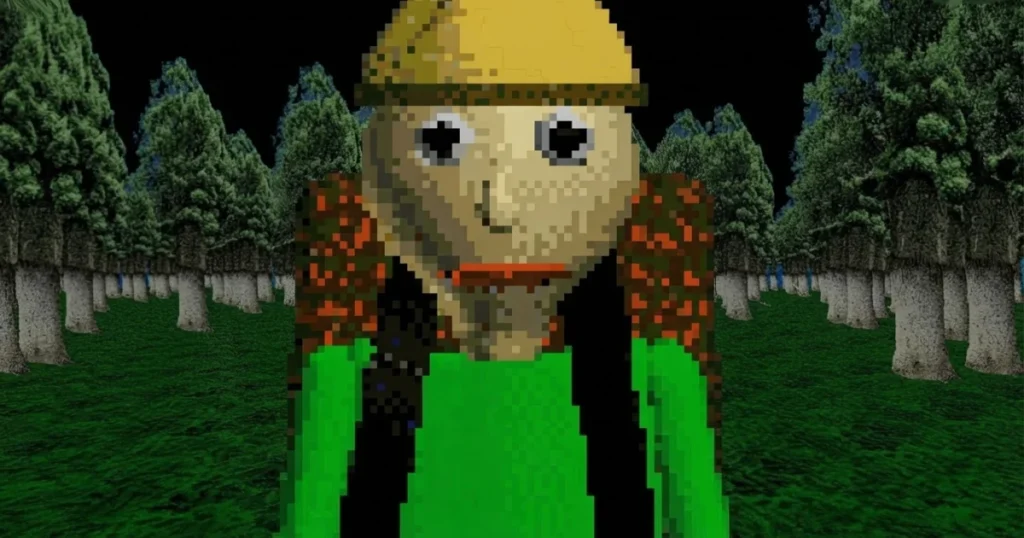












Baldi’s Basics – Field Trip takes the familiar horror-comedy formula out of the classroom and drops you straight into the woods for a camping trip gone very wrong. This is a demo experience built around the Baldi’s Basics kickstarter concept, showing off what field trips could look like in the full game. Jumpscare fans and retro 3D horror lovers will find plenty to enjoy here. The game carries genuine scary moments, so parents may want to check the For Parents section at the bottom of this page.
Table of Contents+
- What Is Baldi’s Basics – Field Trip?
- How to Play Baldi’s Basics – Field Trip?
- Core Gameplay Loop and the Camping Trip Objective
- Environmental Hazards and Baldi’s Pursuit Mechanics
- Survival Strategies for Managing the Campfire and Navigating the Woods
- Where to Play Baldi’s Basics – Field Trip
- More Horror Games You Might Enjoy
- For Parents
- FAQs About Baldi’s Basics – Field Trip
- Jump Into the Campsite Right Now
What Is Baldi’s Basics – Field Trip?
Baldi’s Basics – Field Trip is a first-person, retro 3D horror parody game developed by Play Here and released in 2025. Instead of a school with math problems, the setting is a campsite surrounded by dense woods, and Baldi is your very enthusiastic, very dangerous camp counselor. The game leans hard into the lo-fi graphics style that made the original Baldi’s Basics game a cult favorite, keeping that deliberately rough visual charm intact.
This is a demo, not a full release, so it functions as a focused slice of the camping trip concept rather than a sprawling experience. Think of it as a beta preview of what field trip chapters could bring to the broader Baldi universe. Fans who have followed the Baldi’s Basics wiki or dug into the classic remastered online versions will immediately recognize the tone: cheerful on the surface, deeply unsettling underneath.
How to Play Baldi’s Basics – Field Trip?
Getting started is straightforward. You load into a first-person view of the campsite, and your job is to navigate the woods, interact with objects, and survive Baldi’s pursuit. Two new controls were added specifically for this mod version of the field trip experience, layered on top of the standard control set players familiar with the original Baldi’s Basics game will already know. The game runs smoothly in Chrome, Edge, and Firefox without any download needed.
Desktop Movement and Interaction Keybindings
Movement uses either WASD or the arrow keys. W or the up arrow moves you forward, S or the down arrow moves you backward, and A and D handle strafing left and right respectively. The mouse controls where you look, giving you full first-person camera rotation around the campsite environment. Shift lets you run when Baldi closes in, and Spacebar handles jumping or any action prompt that requires it. Left mouse button is your interact key for picking up items or triggering objects, while right mouse button is used to activate or use whatever item you currently have equipped.
Touchscreen and Mobile Navigation Controls
On touchscreen devices, the game provides on-screen touch controls that replace the keyboard entirely. Tap the screen to interact with objects or jump when prompted, and use the virtual joystick or swipe gestures to move and look around the campsite. The touch layout is designed to keep both movement and interaction accessible without needing a physical keyboard, so mobile players can navigate the woods and manage the campfire just as effectively as desktop players.
Core Gameplay Loop and the Camping Trip Objective
The core loop in Baldi’s Basics – Field Ttip revolves around exploring the wooded campsite area, completing whatever tasks the environment throws at you, and keeping yourself alive while Baldi monitors your every move. Unlike the school setting where math problems triggered Baldi’s aggression, the field trip context replaces puzzles with campsite-based objectives. You follow directions given within the game world, solve the challenges presented, and try to complete the trip without triggering a full pursuit.
The campfire is central to the experience. Keeping it going ties directly into your survival, and neglecting it has consequences for how the session plays out. Each run through the woods is a single-player experience with no checkpoints mid-session, so every decision about where to explore and how long to linger in any one spot carries real weight. The game’s horror category tag is earned through tension rather than constant action, with the threat of Baldi looming over every second you spend away from safety.
Environmental Hazards and Baldi’s Pursuit Mechanics
The woods themselves are a hazard. Navigation in the retro 3D environment can disorient you quickly, and the dense tree layout means Baldi can close distance before you realize he has spotted you. His pursuit mechanics follow the same escalating aggression pattern fans of the original Baldi’s Basics horror game will recognize: the longer you take and the more mistakes you make, the faster and more relentless he becomes. There is no hiding spot that holds forever.
Environmental obstacles in the camping area add pressure on top of Baldi’s chase. The lo-fi graphics style, while intentionally retro, can make depth perception tricky, which means misjudging distances between trees or campsite objects is a real risk. Jumpscare moments are built into specific trigger points, so staying calm and methodical rather than sprinting blindly through the woods is the smarter play. Baldi’s aggression ramps up based on your actions, not just time, so understanding what triggers him is as important as knowing how to run.
Survival Strategies for Managing the Campfire and Navigating the Woods
Prioritize the campfire early. Getting the fire established before you venture deeper into the woods gives you a reference point to return to and keeps the core objective on track. Wandering too far without tending to it first is one of the most common ways runs fall apart, especially for players coming from the school-based Baldi’s Basics game who are used to a more linear indoor layout.
When navigating the woods, use landmarks to orient yourself. The retro 3D environment does not give you a minimap, so picking out distinctive trees or campsite objects as mental waypoints helps you avoid running in circles when Baldi starts his pursuit. Shift to run only when you have a clear path ahead, because sprinting blindly into the tree layout will slow you down more than a steady jog would. Keep your left mouse button ready to interact with any item you spot on the ground, since picking up the right object at the right moment can buy you critical seconds. Finally, right-click to use items the moment the situation calls for it rather than saving them, because hoarding items in a single-session game with no inventory carry-over between runs offers no benefit.
Where to Play Baldi’s Basics – Field Trip
Baldi’s Basics – Field Trip is free to play right now on Arcazi.com, directly in your browser with no download and no registration required.
More Horror Games You Might Enjoy
- Amanda The Adventurer – A creepy VHS-tape horror game where a children’s show hides something deeply sinister.
- Ice Scream – Chase down a terrifying ice cream man to rescue your kidnapped friend before he disappears.
- Vampire Survivors – A relentless survival game where you mow down endless monster hordes with escalating weapons.
- Granny 2 – Escape a nightmare house while avoiding two deadly pursuers in this tense stealth horror game.
- Forsaken – A dark, atmospheric horror experience that keeps the pressure on from the very first second.
- Slenderman – Collect pages in the dark woods while the Slenderman closes in, a pure test of nerve.
All six picks sit squarely in the Horror category, so if Baldi’s camping trip has you hooked on tense, atmospheric games, every title above delivers more of the same.
For Parents
Baldi’s Basics – Field Trip is a horror parody game tagged with jumpscare and first-person content. It uses deliberately retro 3D graphics and a comedic tone, but it does include sudden jumpscare moments and a persistent threat mechanic where a character chases the player. The game involves survival and escape objectives set in a dark woodland environment. Parents of younger or more sensitive children should be aware of the jumpscare elements before letting them play.
FAQs About Baldi’s Basics – Field Trip
How to get Baldi’s Basics Field Trip?
Baldi’s Basics – Field Trip is available to play free online in your browser with no download required. Just head to the game page and it loads instantly.
How to get Baldi’s Basics?
The original Baldi’s Basics game and its various demo versions, including the Field Trip camping demo, are accessible through browser-based platforms. No installation is needed to play the Field Trip version online.
How to survive Baldi’s Basics?
In Field Trip, survival comes down to managing the campfire, staying oriented in the woods, and avoiding actions that trigger Baldi’s aggression. Use Shift to run only when you have a clear escape route ahead of you.
How to decompile Baldi’s Basics?
Decompiling game files is outside the scope of playing Baldi’s Basics – Field Trip in the browser. The browser version runs as a self-contained HTML5 experience with no local files to extract.
How to make Baldi’s Basics less scary?
Knowing Baldi’s trigger points in advance takes away most of the surprise. Once you understand that his aggression escalates based on your mistakes and time spent, the jumpscares become predictable rather than shocking.
What does 81718 do in Baldi’s Basics?
The number 81718 is a reference tied to secrets within the broader Baldi’s Basics game lore, often discussed on the Baldi’s Basics wiki. In the Field Ttip camping demo specifically, the focus is on campsite survival rather than number-based secrets.
Does Baldi’s Basics – Field Trip have a save system?
No, the Field Trip demo does not include a save or checkpoint system. Each session runs from start to finish in one go, so progress resets if you close the game.
Can two players play Baldi’s Basics – Field Trip together?
Baldi’s Basics – Field Trip is a single-player game only. There is no co-op or two-player mode available in this demo.
What are the two new controls added in Field Trip?
The Field Ttip mod introduces two additional controls on top of the standard WASD, mouse, Shift, Spacebar, and click setup. These new inputs are specific to interactions within the camping trip environment and are shown in the in-game controls list when you start.
Is Baldi’s Basics – Field Trip a full game or a demo?
It is a demo, built to showcase what field trip chapters could look like in the full Baldi’s Basics experience. It offers a focused, self-contained camping trip scenario rather than a complete multi-level game.
What kind of horror does Field Trip use?
The game relies on jumpscare moments, a persistent pursuer mechanic, and the disorienting retro 3D woodland environment to build tension. It uses parody horror rather than graphic content, keeping the tone dark but comedic.
Do I need to create an account to play Baldi’s Basics – Field Trip?
No account or registration is needed. The game loads directly in your browser for free, with no sign-up required.
Jump Into the Campsite Right Now
Baldi’s Basics – Field Ttip is free, loads instantly in your browser, and needs no download whatsoever. Head to Arcazi.com and find out how long you can last before Baldi catches up with you.