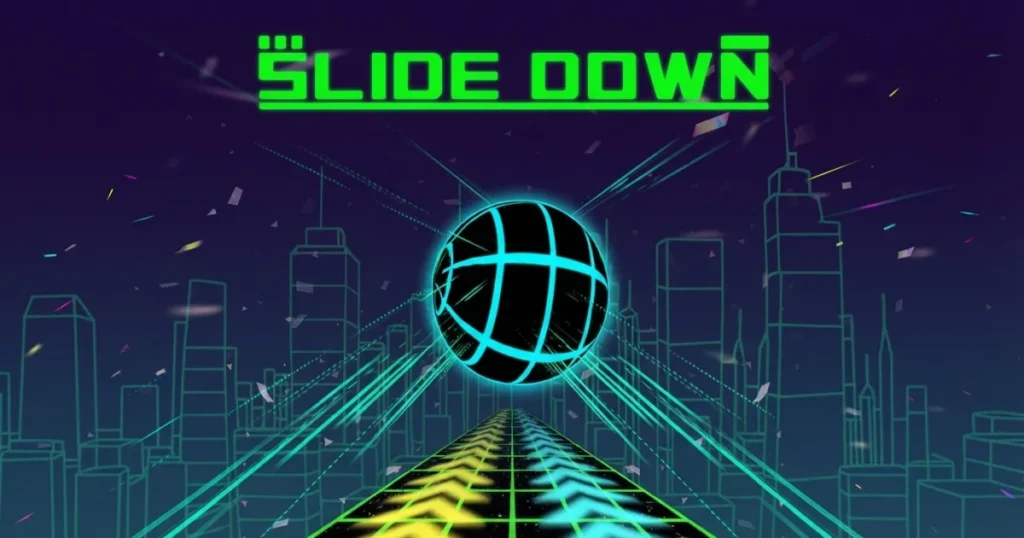








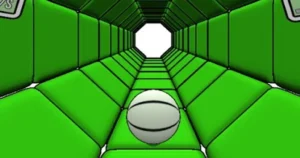



Slide Down drops you onto a never-ending 3D slope where gravity pulls you forward and every obstacle demands split-second reflexes. Steer left and right to avoid barriers, leap over gaps, and ride velocity pads that push your speed past the point of comfortable control. Imangi Studios released the game in 2021, and it remains a pure test of reaction time and rhythm maintenance across procedurally shifting track layouts.
The track twists, narrows, and drops without warning. One missed input sends you tumbling into the void, ending your run instantly. Success depends on reading the terrain ahead, centering your position after each dodge, and resisting the urge to overcorrect when velocity spikes. Every session teaches you to trust micro-adjustments over panicked swerves.
Play it free right now on Arcazi.com in any browser, no download or account required. The game runs smoothly in Chrome, Edge, and Firefox on desktop, and touch controls adapt automatically on mobile devices.
Table of Contents+
What Is Slide Down?
Slide Down is an endless arcade runner built around a single mechanic: steering a rolling object down an infinite slope filled with static and moving hazards. The camera locks behind your position, the track scrolls toward you at increasing speed, and your only inputs are left, right, and jump. There are no levels, no checkpoints, and no second chances. Distance traveled becomes your score, and every meter forward requires tighter timing than the last.
The game strips away progression systems, power-ups, and narrative. You start each run at the same baseline speed, and the difficulty curve emerges organically as the track generator introduces tighter gaps, faster-moving blocks, and narrower safe zones. The challenge is entirely mechanical: can you maintain clean steering under pressure, or will you drift too far and clip an edge?
Imangi Studios designed the game to reward rhythm over reflexes. Players who develop a consistent left-right cadence and anticipate hazards three seconds ahead consistently outlast those who react to obstacles as they appear. The skill ceiling is high, but the learning curve remains accessible because every mistake teaches you exactly where your timing broke down.
How to Play Slide Down?
Your goal is simple: survive as long as possible by steering around obstacles and staying on the track. The slope auto-scrolls, pulling you forward at a speed that increases gradually over time. Barriers, moving blocks, and sudden voids appear in your path, and hitting any of them ends your run immediately. You steer left and right to dodge hazards, jump to clear low obstacles or cross short gaps, and ride booster pads to gain temporary speed bursts that multiply your score multiplier.
The game runs in your browser without installation. Desktop players use arrow keys for steering and spacebar for jumping, while mobile players swipe left or right and tap to jump. Tilt steering is available on mobile devices that support gyroscope input, letting you lean your phone to adjust direction. The game adapts to your input method automatically, so you can switch between devices mid-session without relearning controls.
Runs end when you collide with an obstacle or fall off the track. There is no health bar, no retry button, and no continue system. Each attempt starts fresh from zero distance, and your best score persists across sessions. The game saves your high score locally in your browser, so clearing cache or switching devices resets your record.
Desktop Keyboard Navigation
Arrow keys control all movement on desktop. Left and right arrows steer your position across the track, with each tap shifting you one lane in that direction. Holding an arrow key moves you continuously, but overcorrecting is the most common cause of death at high speeds. Spacebar triggers a jump, lifting you over low barriers and letting you clear short gaps between track segments.
The game does not support mouse input. All navigation happens through keyboard presses, and the responsiveness is tuned for rapid tapping rather than smooth analog steering. Players who develop a rhythmic tap pattern, alternating left and right in small increments, maintain better center-line positioning than those who hold keys down and drift into walls.
Pause functionality is minimal. Pressing Escape or clicking away from the game window freezes the action, but there is no in-game menu or settings panel. You resume by clicking back into the window and tapping any key. The game runs at a fixed framerate, so performance remains consistent across different desktop hardware.
Mobile Touch and Tilt Steering
Touch controls simplify input to two gestures: swipe left or right to steer, tap anywhere to jump. Swiping does not require precision; a quick flick in either direction registers as a lane change, and the game interprets the swipe direction rather than measuring distance. Tapping the screen triggers a jump regardless of where your finger lands, so you can keep your thumb in a comfortable position and react without looking at the input zone.
Tilt steering activates automatically on devices with gyroscope sensors. Leaning your phone left or right shifts your position smoothly across the track, offering finer control than swipe gestures but requiring you to hold the device at a consistent angle. Tilt sensitivity is fixed, so players who prefer swipe input can ignore the tilt mechanic entirely without penalty.
Mobile performance depends on your device’s GPU. Older phones may experience frame drops at extreme speeds, which can make timing jumps harder. The game does not offer graphics settings, so if you notice stuttering, closing background apps or restarting your device usually restores smooth playback.
Track Layouts and Environmental Obstacles
The track generates procedurally, pulling from a pool of obstacle patterns that increase in density as your run progresses. Early segments feature wide lanes and sparse barriers, giving you time to learn the steering response. After the first hundred meters, the generator introduces moving blocks, narrower safe zones, and sudden elevation changes that force you to jump mid-turn.
Track width varies unpredictably. Some sections span five lanes, letting you dodge left or right with room to spare. Others compress to a single lane flanked by walls, requiring perfect centering to avoid clipping an edge. The camera angle remains fixed, so you cannot look ahead beyond the visible horizon. Reading the track becomes a skill: experienced players recognize obstacle patterns by their silhouette and pre-position themselves before the hazard fully renders.
Environmental theming is minimal. The slope is a flat 3D plane textured with a grid pattern, and obstacles are simple geometric shapes colored to contrast against the background. There are no weather effects, no day-night cycles, and no visual distractions. The aesthetic prioritizes clarity over spectacle, ensuring you always know where the safe path lies.
Static Barriers and Moving Block Hazards
Static barriers are the most common obstacle type. They appear as solid blocks placed across one or more lanes, forcing you to steer around them or jump if they are low enough. Barriers never move once spawned, so you can plan your route as soon as they appear on the horizon. The challenge comes from chaining multiple barriers in quick succession, where dodging one obstacle positions you poorly for the next.
Moving blocks slide left and right across the track at fixed intervals. They follow predictable patterns, but their timing syncs poorly with your forward momentum, so you cannot simply memorize a safe path. Instead, you must read the block’s current position, estimate where it will be when you reach that point, and steer into the gap it leaves behind. Misjudging the timing by half a second sends you into the block’s path, ending your run.
Some sections combine static and moving hazards in the same lane. A stationary barrier might block the left side while a moving block sweeps the right, leaving only a narrow window in the center. These patterns punish hesitation. Commit to a lane early, adjust once mid-approach, and resist the urge to second-guess your choice. Overcorrecting at the last moment is deadlier than holding a slightly imperfect line.
Voids, Sudden Drops, and Narrow Sky Paths
Voids are gaps in the track where the floor disappears entirely. They range from single-tile holes you can jump over to multi-lane chasms that require precise positioning before you leap. Falling into a void ends your run instantly, with no chance to recover. The game does not telegraph voids with visual cues beyond the absence of floor texture, so you must scan the track constantly and jump preemptively when you see darkness ahead.
Sudden drops occur when the track elevation shifts downward without warning. Your momentum carries you forward into open air, and you fall until the next track segment appears below. These drops do not kill you, but they obscure your view of upcoming obstacles, making it easy to land directly on a barrier. The best strategy is to center yourself before a drop and avoid steering until you touch down, giving you maximum reaction time for whatever hazard waits below.
Narrow sky paths are elevated sections where the track shrinks to a single lane suspended over a void. Falling off either side ends your run, and there is no margin for error. These sections often follow high-speed booster pads, so you enter them at maximum velocity with minimal control. The key is to stop all steering input the moment you land on the narrow path, letting your forward momentum carry you straight until the track widens again. Any attempt to correct your position mid-path usually results in oversteering into the void.
Speed Boosters, Jump Pads, and Collectibles
Speed boosters are glowing pads placed on the track that multiply your velocity when you roll over them. Hitting a booster increases your forward speed by roughly 50 percent for three to five seconds, depending on the pad type. Faster speeds mean higher score multipliers, but they also compress your reaction window. A hazard that gave you two seconds to respond at normal speed now demands a decision in under one second.
Jump pads launch you into the air, carrying you over obstacles and gaps that would otherwise require manual jumping. They appear less frequently than speed boosters and are usually placed before complex hazard sequences. The arc and distance of the jump are fixed, so you cannot adjust your trajectory mid-air. If a jump pad launches you toward a barrier, you must steer before you land, not during the flight. Mistiming your pre-jump positioning sends you directly into the obstacle you were meant to clear.
Collectibles are small glowing orbs scattered across the track. Grabbing them adds points to your score but does not affect gameplay mechanics. They are often placed in risky positions, such as the outer edges of lanes or directly between moving blocks. The game does not reward you for collecting every orb, so experienced players ignore collectibles that require dangerous detours and focus only on those that sit along their intended path.
Navigating Velocity Pads and Elevation Jumps
Velocity pads appear in clusters, often three or four in a row, each stacking another speed multiplier on top of the last. Hitting all pads in a sequence can triple your base speed, pushing the game into a near-unplayable state where obstacles blur past faster than you can process them. The temptation is to chase every pad for maximum score, but survival requires selective avoidance. If a pad sits in a lane blocked by hazards, skip it and maintain a survivable speed instead.
Elevation jumps combine jump pads with sudden drops, launching you upward and then letting gravity pull you down onto a lower track segment. The camera does not adjust during these jumps, so you lose sight of the landing zone for a full second. The safest approach is to center yourself before hitting the jump pad, avoid all steering input during the flight, and resume control only after you land. Trying to dodge obstacles mid-air is impossible because your horizontal movement is locked once you leave the ground.
Some velocity pads sit immediately before narrow sky paths or moving block sequences. These placements are intentional traps. The game expects you to recognize the danger and steer around the pad, sacrificing score for survival. Players who blindly chase every booster rarely survive past the 500-meter mark. The skill is knowing when to slow down, not how to go faster.
Risk Assessment When Collecting Track Items
Collectibles are scored at one point each, while distance traveled awards ten points per meter. This means a single extra second of survival is worth more than ten collectibles. The math makes it clear: prioritize staying alive over chasing orbs. Collectibles placed in the center lane along your natural path are free points. Collectibles placed on the outer edges or between hazards are bait, designed to lure you into risky maneuvers that end your run.
Some players ignore collectibles entirely and focus purely on distance. This strategy works because the score multiplier from speed boosters and survival time far outweighs the points from orbs. Other players collect only the orbs that require zero deviation from their intended steering path. Both approaches are valid, but the worst strategy is trying to grab every collectible. That playstyle guarantees frequent deaths and lower average scores.
The game does not track collectibles separately from your total score, so there is no achievement or unlock tied to collecting a certain number. They exist purely as optional score padding. If you find yourself dying repeatedly while chasing orbs, stop collecting them for a few runs and watch your average distance improve. Once your survival skills are solid, you can reintroduce selective collecting without sacrificing consistency.
Pro Strategies for Setting High Scores
High scores in Slide Down come from two factors: distance traveled and speed multiplier. Distance is a function of survival time, and speed multiplier is a function of how many boosters you hit without dying. The best players balance both by maintaining a rhythm that keeps them centered on the track while selectively hitting boosters that do not lead into immediate hazards. Chasing maximum speed without regard for positioning results in explosive deaths. Playing too conservatively caps your score ceiling because you miss too many multipliers.
The key is developing a mental model of safe versus risky boosters. A booster followed by a wide, empty lane is always safe. A booster followed by a narrow path or moving blocks is a calculated risk. A booster placed directly before a void or sudden drop is a trap. Learning to read these patterns in the half-second before you reach the pad separates average players from top scorers.
Another critical skill is recovering from mistakes without panicking. If you drift too far left and clip a barrier’s edge, your instinct will be to jerk the controls right to avoid a second hit. That overcorrection usually sends you into a hazard on the opposite side. Instead, make one small correction, assess your new position, and then make a second adjustment if needed. Smooth, incremental steering beats frantic swerving every time.
Center Line Recovery and Rhythm Maintenance
The center lane is your home position. Every dodge should end with you drifting back toward the middle, not hugging the left or right edge. Staying centered gives you equal reaction time for hazards on either side, while camping on an edge cuts your options in half. After dodging a barrier, tap the opposite direction key once or twice to nudge yourself back toward center, then stop. Do not hold the key down or you will overshoot and waste time correcting again.
Rhythm maintenance means tapping keys at a consistent tempo rather than mashing randomly. Good players develop a left-right-left-right cadence that keeps them centered even at high speeds. The rhythm does not need to be fast; it needs to be steady. Each tap shifts you one lane, and two taps in quick succession move you two lanes. By internalizing this timing, you stop thinking about individual key presses and start thinking in terms of lane changes, which frees up mental bandwidth to read the track ahead.
When your rhythm breaks, stop steering entirely for half a second. Let your forward momentum carry you straight while you visually reacquire the center line, then resume tapping. Trying to correct your rhythm while still steering usually makes the problem worse. A brief pause resets your internal timing and prevents cascading errors.
Micro-Steering Techniques for Extreme Velocities
At speeds above 150 percent of baseline, the track scrolls so fast that full lane changes become dangerous. A single held key press can carry you two lanes over before you react, slamming you into a wall you never saw coming. Micro-steering solves this by replacing held inputs with rapid single taps. Each tap shifts you a fraction of a lane, giving you finer control without sacrificing responsiveness.
The technique requires retraining your muscle memory. Instead of holding left to dodge a barrier, tap left three times in quick succession, pausing between each tap to assess your position. This sounds slower, but it prevents the overshoot that kills most high-speed runs. Once you internalize the timing, micro-steering becomes automatic, and you will find yourself threading gaps that previously felt impossible.
Extreme velocities also compress your visual processing time. Obstacles appear on the horizon and reach you in under a second, leaving no time to deliberate. The solution is to stop trying to identify every hazard and instead react to shapes. A vertical rectangle is a barrier; steer around it. A horizontal gap is a void; jump over it. A moving shadow is a block; wait for it to pass. By reducing obstacles to geometric patterns, you bypass the cognitive delay of naming and categorizing, shaving precious milliseconds off your reaction time.
Where to Play Slide Down
Play Slide Down free right now on Arcazi.com in your browser. No download, no account, no install required. Also available on Google Play for Android. Also available on the App Store for iOS.
More High-Speed Arcade Challenges
If you enjoyed the reflex-driven gameplay of Slide Down, these titles offer similar tests of timing and precision:
- Snow Road 3D – Steer a sled down an icy slope filled with obstacles and tight turns that demand perfect timing.
- Run 2 – Navigate gravity-defying tunnels where walls become floors and every jump requires spatial awareness.
- Tap Tap Shots – Sink baskets with precise timing in a fast-paced arcade challenge that rewards rhythm over power.
- Super Liquid Soccer – Control a bouncing ball through soccer-inspired obstacle courses that test your reflexes.
- Chicken Jockey Clicker – Build an automated chicken empire in this idle game that rewards strategic upgrades.
- King Of Fighters – Master combo timing and special moves in this classic fighting game that demands precision.
Explore the full Arcade collection for more reflex-driven challenges that test your timing under pressure.
For Parents
Slide Down is a reflex-based arcade game with no violent content, dialogue, or social features. The gameplay consists entirely of steering a rolling object down a geometric slope while avoiding abstract obstacles. There are no characters, no combat, and no narrative elements. The game requires no personal information, no account creation, and no in-game purchases. It runs entirely in the browser with no external downloads or installations required.
FAQs About Slide Down
How to play slide on guitar?
This question refers to guitar slide technique, not the game Slide Down. For the game, use arrow keys to steer and spacebar to jump on desktop, or swipe and tap on mobile devices.
How to play slide on electric guitar?
This question refers to electric guitar slide technique, not the game Slide Down. The game requires no musical knowledge and is played using keyboard or touch controls in your browser.
How to play slide on guitar goo goo dolls?
This question refers to a specific song technique, not the game Slide Down. The game is an arcade runner with no connection to music or guitar playing.
How to play slide on acoustic guitar?
This question refers to acoustic guitar slide technique, not the game Slide Down. The game is a browser-based arcade runner controlled with arrow keys or touch gestures.
How to play slide on powerpoint?
This question refers to Microsoft PowerPoint presentation software, not the game Slide Down. The game runs in your browser and requires no presentation software.
How to play slide on stake?
This question refers to a gambling platform, not the game Slide Down. The game is a free arcade runner with no gambling mechanics or real-money features.
How to play slide on piano?
This question refers to piano glissando technique, not the game Slide Down. The game is a 3D arcade runner with no musical elements or piano controls.
How to play slide on canva?
This question refers to Canva design software, not the game Slide Down. The game runs in your browser as a standalone arcade experience with no design tools.
Can I play Slide Down on mobile devices?
Yes, Slide Down works on mobile browsers with touch controls. Swipe left or right to steer, tap to jump, and tilt your device for gyroscope steering if your phone supports it.
How do I increase my score in Slide Down?
Score increases with distance traveled and speed multipliers from booster pads. Hit boosters when the path ahead is clear, stay centered to avoid obstacles, and prioritize survival over collecting orbs.
Does Slide Down save my progress?
The game saves your high score locally in your browser. Clearing your browser cache or switching devices will reset your saved score, as there is no account system.
What happens when I hit an obstacle in Slide Down?
Hitting any obstacle or falling off the track ends your run immediately. There is no health system, no continues, and no checkpoints. Each run starts fresh from zero distance.
Start Your Endless Descent
Slide Down is free to play right now on Arcazi.com in your browser. No download, no signup, just instant arcade action that tests your reflexes and rewards clean steering. Load the game and see how far you can survive.